Site Caps
Events allows you to set the capacity for any menu so that once capacity is reached, the menu is no longer made available to new bookings. You can apply capacity restrictions to an estate, a parent company and/ or individual sites. Capacity settings are inherited from the company and/ or the estate, so once defined at estate or company level, that value is applied to every site below it in the hierarchy. Adding a capacity at site level will override the inherited default.
Site Caps Topics
Setting Up Site Caps
Follow the steps to define a site caps for a menu:
-
Expand from the Outlets to display companies and sites
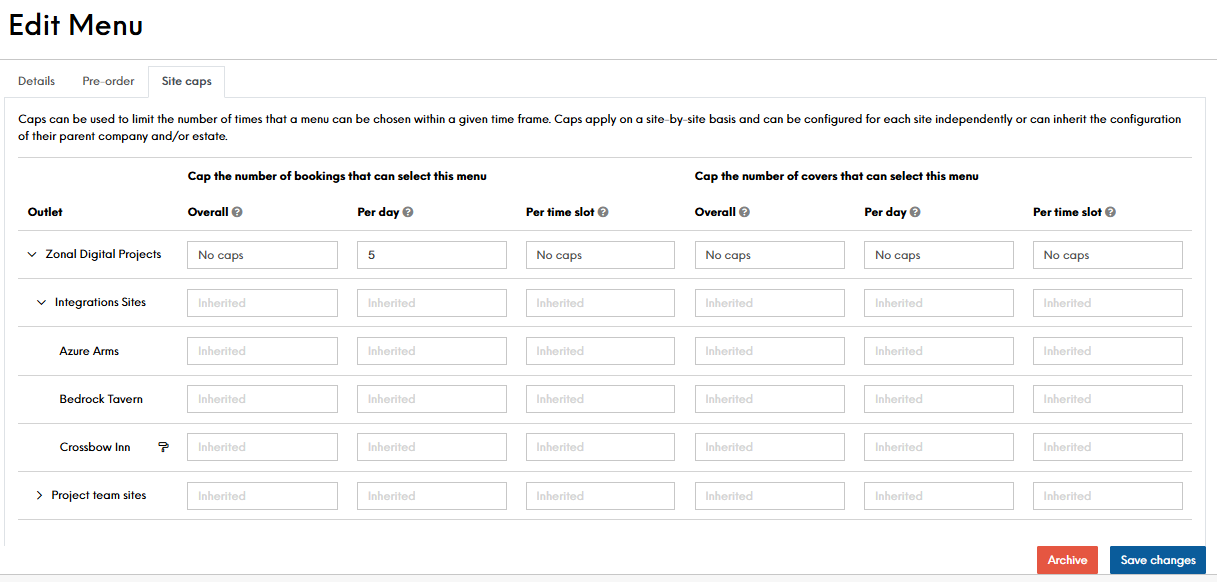
-
Define your site caps
-
Click Save Changes
Once saved, you will be taken back to the Menus front page
Field Settings & Information
The following information describes each of the Capacity Settings.
Capacity settings can be based on the number of bookings, the total number of covers or a combination of both, and these can apply per time slot, per day and/ or to the lifetime of the menu. The below table outlines how each will impact your guest journey
| By Bookings | Description |
|---|---|
| Overall |
Set the capacity by total number of bookings this menu can be selected for a booking. Once the capacity is reached, this menu will no longer be available to customers for selection at that site |
| Per Day |
Set the capacity by total number of bookings menu can be selected on any given day. Once the capacity is reached, this menu will no longer be available to customers for selection at that site for that day |
| Per Timeslot |
Set the capacity by total number of bookings this menu can be selected for a given timeslot. Once the capacity is reached, this menu will no longer be available to customers for selection at that site for that timeslot |
| By Covers | Description |
|---|---|
| Overall |
Set the capacity by total number of covers this menu can be selected for. Once the capacity is reached, this menu will no longer be available to customers for selection at that site |
| Per Day |
Set the capacity by total number of covers the menu can be selected for on any given day. Once the capacity is reached, this menu will no longer be available to customers for selection at that site for that day |
| Per Timeslot |
Set the capacity by total number of covers this menu can be selected for any given timeslot. Once the capacity is reached, this menu will no longer be available to customers for selection at that site for that timeslot |