What's New in Bookings - 1.98.0 | 2.98.0
6 October 2026
click here for past feature updates
click here for resolved issues
Events
Schedule Exclusions – Extras and Areas
You can now exclude specific dates from an Extra's or Area's schedule using the calendar, the same way you already can for Occasions and Menus. For example, you can make an extra unavailable on Christmas Day without building a recurrence rule for it.
Scheduling now behaves the same way across Occasions, Menus, Extras and Areas.

Guest Portal V2
Pay for a Pre-Order from the Basket
Guests can now pay for their pre-order straight from the basket. Once they have finished choosing their items, a Pay for your pre-order button appears and takes them to payment with their pre-payment requirement already selected.
Guests previously had to find the payment page themselves after finishing their pre-order.
This option is only available on Guest Portal V2.
Quality of Life Improvements
This release also includes a group of smaller changes to everyday use. None of them add new capability. Each one removes something customers told us was getting in the way, across Events Host, Events Admin and Tables Host.
| Feature | Description |
|---|---|
| Tables Host – Provisional bookings |
Provisional bookings now stand out in your booking lists. A highlighted indicator appears first on every provisional booking, so your team can spot unconfirmed bookings at a glance during service. |
| Events Host – Protecting your changes |
Two changes make the booking journey safer to work in. If you have changed a detail but not confirmed it, you can no longer continue past that step, so a change can't be silently lost. Clicking outside the booking window no longer closes it either, so a half-finished booking stays where you left it. |
| Events Admin – Dynamic fields |
Inserting dynamic fields into an email template is now one click. Selecting Dynamic Fields shows the full list straight away instead of a list inside another list. |
Past Feature Updates
Guest Portal V2
Guest Portal Customiser – New Display Controls
Three new options in the Guest Portal Customiser give you finer control over exactly what guests see in the portal. Administrators can now hide the children cover selector when a guest amends a booking, leaving a single guest count; hide the pre-order countdown clock and payment required-by dates – two independent toggles, so you can communicate your own deadlines to guests separately from the cut-offs configured in the system; and hide your venue's contact email and/or phone number, steering guests towards your preferred contact channels.
All three settings are display-only – booking rules and system cut-offs are unaffected. Each can be enabled per company in the Guest Portal configuration in Events Admin.
This option is only available on Guest Portal V2.
Guest Portal V2
Guest Portal Login – Email and Phone Number
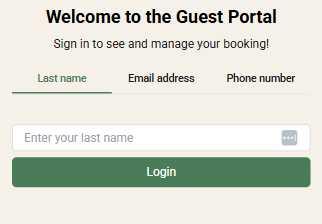
Guests can now sign in to the Guest Portal using their email address or phone number, in addition to last name. This makes portal access more reliable when a surname was recorded differently at booking time — for example on phone bookings.
Each login method can be enabled per company in the Guest Portal configuration in Events Admin, and a preferred login method can be chosen to appear first on the login page. Last name remains available at all times. Email or phone login can only be enabled when the corresponding field is set to mandatory in Contact Methods. Phone numbers are matched regardless of formatting, including spaces and country codes.
This option is only available on Guest Portal V2.
Events
Share Booking with Attendees – Invite Link
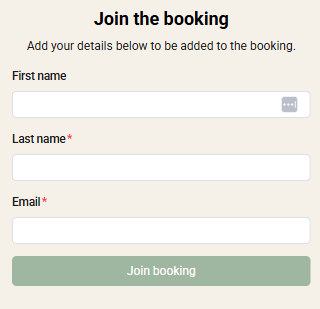
Lead guests can now invite their party to a booking with a single shareable link. From the Guests page, the lead guest selects Share invite link and shares it via copy, WhatsApp, or their device's share options. Anyone opening the link enters their own details on a registration page — no login required — and is added to the booking as an attendee, landing directly in their own Guest Portal view.
Attendees no longer need to be added one by one by the lead guest. Adult covers only; children should still be added by the lead guest. The feature can be enabled or disabled per company in the Guest Portal configuration and is enabled by default.
This option is only available on Guest Portal V2.
Guest Portal V2
Extras in the Guest Portal
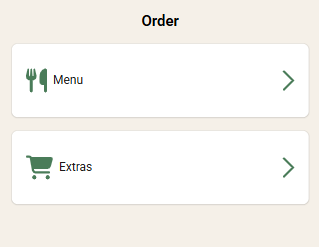
Guests can now view, add, and manage Extras on their booking through the Guest Portal, and pay for them ahead of their visit — previously Extras could only be added while making the booking. Guests select quantities into a basket, with each extra's minimum/maximum settings and site capacity limits respected throughout.
Paid extras are protected: quantities can be increased at any time, but a basket can never be reduced below the value already paid. If a booking edit (date, time, or covers) would make an unpaid extra unavailable, the guest is warned before it is removed; edits that would affect a paid extra are blocked and the guest is directed to contact the site.
This option is only available on Guest Portal V2.
Guest Portal V2
Guest Portal v2 Customiser – Phase 3
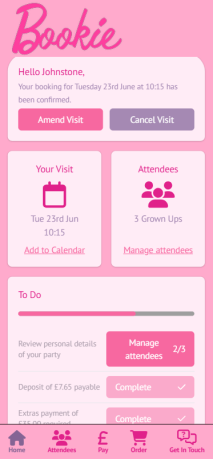
Phase 3 adds brand logo support and content visibility controls to the template builder. Administrators can upload a logo to display in the portal and on the login screen, and can now hide or show specific elements per template — including the venue location, Next Steps dates, event name, adult and children description text, and the "Message Us" button on the Contact page. A new calendar background colour option is also available on the Edit Booking page. Finally, the Whimsy tab has been updated with confetti trigger controls — administrators can choose specific guest moments to celebrate with a burst of confetti in the portal.
Events
Extended Turn Time Configuration (Events & Tables)
The maximum turn time has been increased from 6 to 10 hours to support longer-format dining and events. This applies to the turn time dropdown in Events Admin (Manage Sites – Turn Times) and the manual override in Tables Host – Guest Details, both of which now accept values up to 10 hours in 5-minute increments. All existing configurations are unaffected.
Guest Portal V2
Guest Portal V2 Customiser – Phase 2
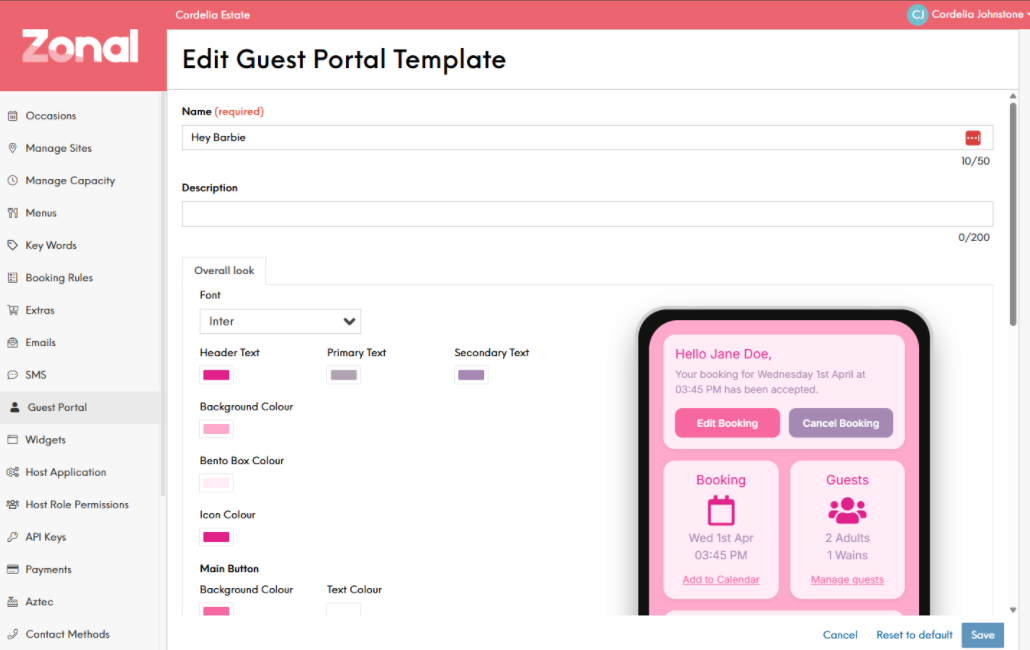
Phase 2 expands on the visual styling introduced in 1.93 with a new set of text and label customisation options. Administrators can now rename key labels and button text across the guest portal — including the Edit Booking and Cancel Booking buttons, the Booking, Guests, and Next Steps labels, and the heading for each portal page (Guests, Payments, Menu, and Contact). Adult and child terminology and descriptions can also be customised, updating the guest portal icons, labels, and cover entry buttons accordingly.
Events
Optional Extras – Terms & Conditions
A dedicated Terms & Conditions field has been added to optional extras in Events Admin. This allows operators to communicate important conditions to guests — such as age restrictions on alcohol-related extras. T&Cs are displayed on the booking widget and returned via the getUpsells API response.
Events
Optional Extras – Rich Text Descriptions
Operators can now format occasion, menu, and extra descriptions using a rich text editor in Events Admin. A toggle on each description field switches between plain text and rich text, supporting bold, underline, hyperlinks, and paragraph breaks. The 800-character limit still applies, existing plain text descriptions are unaffected, and rich text content is returned as HTML through the API and rendered in the booking widget. The same rich text capability is also available for extra Terms & Conditions.
Events
Optional Extras – Prioritisation
Operators can now control the order in which optional extras are presented to guests during the booking journey via the API. Extras are sorted based on their internal name as configured in Events Admin, matching the existing ordering behaviour for occasions. This ensures the most important extras are always shown first.
Guest Portal V2
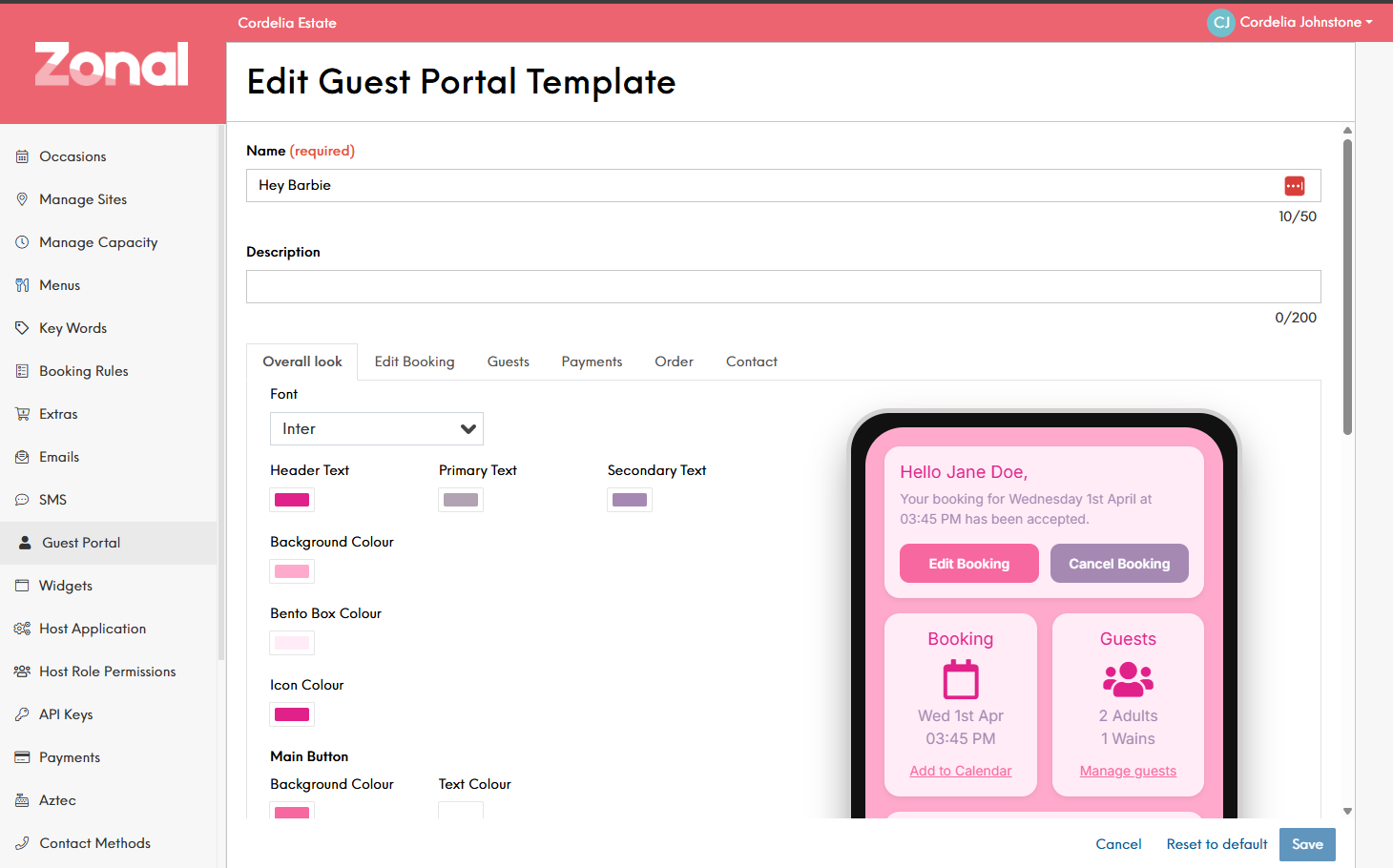
Phase 1 - Guest Portal V2 Customiser
Estate administrators can now customise the look and feel of Guest Portal V2 to match their brand. Control fonts, colours, and button styles across the portal with a live preview updating as you make changes.
Events
Bookings Connect - Aztec to Sync directly to Events
Aztec can now directly sync bookings and payments to Events. We've enhanced how events receives these syncs to not only improve performance and stability especially in those busier periods.
Tables
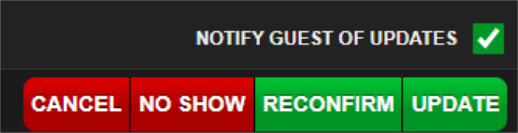
Option to not send updates when updating a booking
Updates made in Tables Host can now be saved without triggering a notification to the guest. This brings Tables in line with Events Host and gives staff the flexibility to make minor booking changes without unnecessarily alerting guests.
Tables
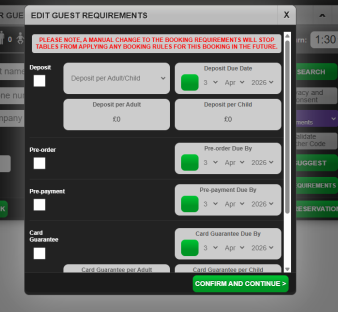
Tables - Enhancing Host Override requirements to match booking rules
We have enhanced our Host requirements for Tables. The host will now have all requirements available to them and also an improved booking journey. This enhancement gives the host even more flexibility when needed in regards to requirements.
Events
[Events] Estate admin - Customer Email Enable/Disable in audit
Within our audit in events admin, we now display entries for whenever a user enables/disables an email template.
Guest Portal V2
Guest Portal V2 - Minimum notice period for edits in Occasions and Menus
Within Occasions and Menus, you can now configure a minimum notice period for guest portal edits. This allows the admin to prevent guest portal edits within a desired time period.
Tables
Tables - New Icon on bookings for Guest Portal Edits
Within tables we will now display an icon to indicate whether a booking has been edited. This gives the host more visibility over any changes to upcoming bookings.
Events
Events - Enhancing Host Override requirements to match booking rules
Within events host, we have added additional requirements available to the host when performing a host override. This now matches the available requirements within booking rules. Giving the host more flexibility.

Guest Portal V2
Refining the Guest Portal Experience when editing a booking
We have introduce a new edit option for the guest portal V2 where booking requirements will be ignored when editing a booking. This option will streamline the edit experience even more for users as there are less restrictions and adjustments to booking requirements.
Events
Bookings – Realtime Event Feed (Webhook service enhancements)
We have further enhanced the functionality to offer even more flexibility in configuring webhooks. We can now configure multiple webhooks under the estate where we previously only allowed one. Alongside that we now send even more information in the webhooks in regards to consent, customer information and additional booking information. We also allow the ability to not send certain information such as PII, No shows and Enquiries so the webhook can be configured to be more in line with what is required for the user.
Events
SignalR Web Socket Server for Bookings
We have now implemented SignalR into Bookings. This will reduce any strain caused when customers would disconnect and reconnect to the server. Currently, socket.io is used which causes them to request all their data again after reconnecting. As we switch from socket.io to SignalR, this will allow customers to only request the date missed during the disconnection instead of requesting all data. This will result in a smoother and more efficient user experience.
Events
Switch Emails On/Off
We have now added in the ability for the events admin to enable/disable emails per company. Similar to SMS, we now have a toggle to enable/disable emails if there are any email templates the admin wishes to not send.

Guest Portal
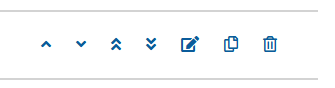
Booking Rules – Move to top and Bottom Buttons
We have introduced a nice quality of life change to booking rules to aid with booking rule management. There are two new buttons which will allow the user to move booking rules to the top or bottom of the list.
Events
Schedule - Collapsible section and user Information to assist better understanding of the feature
We have now made the schedule collapsable for Occasions / Menus. This change was made to prevent users from thinking a schedule was mandatory.
Guest Portal
New import tool error messages
We have introduced some improved error messaging when importing csv files. We will now specify if Adult covers or Child covers have an invalid value to assist with troubleshooting error messages.
Events
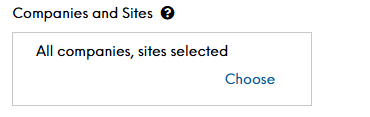
Improved User Message for Site allocation on Occasions, Menus and Extras
When assigning Occasions / Menus / Extras to a site we will now more accurately display if all companies / sites are selected or not to better help the user know precisely what sites / companies are selected.
Guest Portal
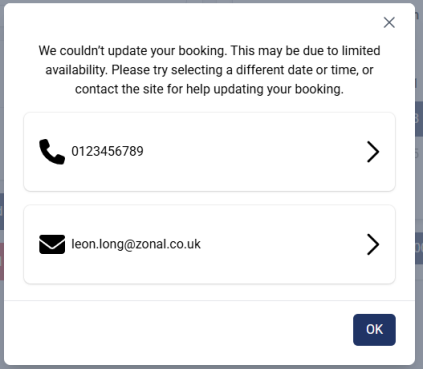
Improved wording on error messages
We have now introduced clearer wording in regards to booking edits so the user knows why they are unable to make an edit to their booking. We will now notify the user that the reason they cannot edit may be related to availability of the site.
Events
Aztec configuration in Events
Aztec can now be configured within events and no longer requires setup in reservations. Bookings, payments and refund syncs will now be handled via events also, meaning Bookings users will now have the most up to date information regarding bookings, payments etc.
Another benefit of this feature is allowing users to now configure multiple payment ID's, meaning we can send more accurate information to Aztec in regards to what payment type was used.
Tables/Events
Hosts now receive a warning when no tables are available for updated covers
We have now improved Functionality when a host updates a booking and there are no available tables. Previously there was limited/no messaging for when a host would make a change to the covers, this could result in a table being lost if it wasnt locked.
We will now notify the host there isnt an available table and will give them the option to lock the table before proceeding.
Guest Portal
Correctly display available portions according to iOrder configuration
We have now added support in the guest portal to support Hidden portions configured in iOrder.
The guest portal will now display portions in accordance to its iOrder configuration. This means if you only wanted a large glass of wine available in a menu, the guest portal will now display the portions accordingly.
Guest Portal
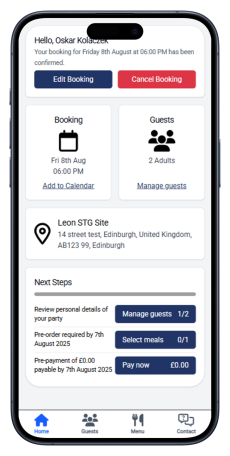
Events Guest Portal V2
The updates for our V2 guest portal are now available for mobile and desktop.
Contact your Zonal Account Representative to have this feature enabled.
The portal can be enabled for the entire company, or restricted to selected sites where the new guest portal will be available.
Guest Portal
Desktop Changes for V2 Guest Portal
This release includes further updates to the guest portal on desktop. The chat component has been optimised, and WorldPay and FreedomPay are now supported as integrated payment providers within the portal.
Widget
Booking Widget Analytics with Google Tag Manager
Within the booking widget configuration, you can enable analytics through Google Tag Manager to gain deeper insights into guest journeys and interactions.
For more information and setup click here
Events
Capacity Limits for Extras
Site caps can be applied to extras, allowing you to set either an overall limit after which no further extras are available or a daily restriction, where the number available per day can be configured. These caps apply consistently across the API, Tables Host, Events Host, and the Booking Widget.
Click here for more information on managing extras.
Other Features & Information
| Feature | Description |
|---|---|
| Events Host Pre-Order Resend |
The text shown when resending pre-orders has been enhanced to display the following Are you sure you want to retry sending this pre-order? Please ensure stock has been put back into stock to ensure successful retry There is only 1 retry attempt possible, should there still be an issue and the items fails to send you have to manually add it to the pre-order |
| Updates to Pre-Orders |
Ahead of the seasonal increase in Christmas pre-orders, updates have been made to ensure that both onsite operations and guest orders can be managed smoothly and successfully
|
Events
Key Words
You can now display additional information to guests during the booking journey using Key Words. By adding context to occasions, menus, and areas such as ‘dog friendly’, ‘gluten free menu’, and more guests are better informed when making their choices.
Guest Portal
Updated Guest Portal
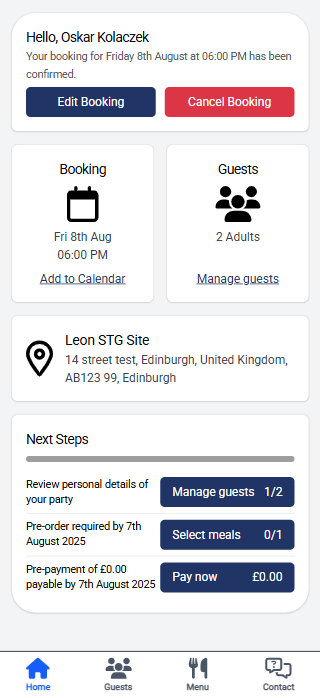
The mobile experience for guests has been enhanced with the ‘Guest Portal V2’ functionality (enabled by Zonal). Selected sites can be activated individually, giving flexibility in how the new portal is rolled out. The functionality remains the same, but is delivered through an improved, more user-friendly mobile experience.
Guests can now add their booking directly to their preferred calendar, including Apple Calendar, Google Calendar, Office 365, Outlook, or Yahoo. The ‘Next Steps’ section offers guidance and quick access to any outstanding actions, while a new task bar at the bottom of the screen enables easy navigation between sections.
Other Features & Information
| Feature | Description |
|---|---|
| Events Admin Audit |
The experience with the audit screen now matches that of occasions and menus with selectable columns providing flexibility on the information to be displayed. New log types have been added to expand the information displayed All, Booking Rule, Menu, Occasion, Special Day and Standard Day. A site column helps identify changes that effected specific locations especially around standard and special day changes. Click here for more information on the Admin Audit |
|
Removal of Payments in Reservations via Events |
To streamline payment processing, we are removing the ability to use Reservation Payment Providers, directing all traffic to Events for a more efficient and seamless payment experience. This shift will help customers select from more payment providers and use the latest payment gateways which they offer. |
Events Host - Payments
Request Payments from Guests (which is not required as part of the booking)
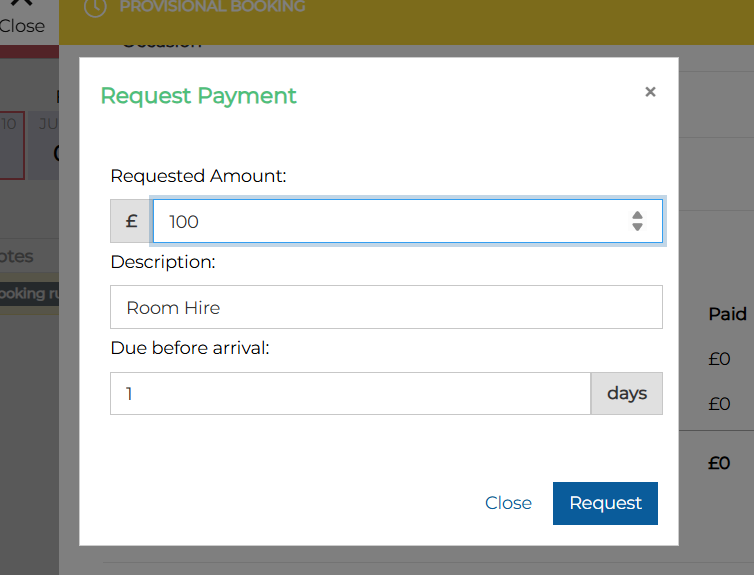
The Events Host can now request payments directly on a booking. These payments are separate from standard booking requirements and can be used to account for specific items such as room hire.
This feature enabled by Zonal will allow system administrators to configure on per a per outlet level if payment requests can be made.
When a host requests a payment, a popup appears allowing them to enter the amount and a description. This description is then displayed to the guest in the guest portal.
Click here for more information on the setup of payment requests.
Other Features & Information
| Feature | Description |
|---|---|
| API External IDs |
An external ID can now be added to an occasion which is visible via the API. In occasions settings an 'External ID' field is now displayed allowing information to be added and be presented in the getOccasions API call. Click here for more information on occasions. |
Other Features & Information
| Feature | Description |
|---|---|
|
Time Set as it own Parameter for Schedule Information |
Time has been added as its own field within the API for menus / occasions / areas and extras. All API calls for these options will include start and end times as their own unique fields for schedule information. |
Events - SMS
SMS Communications
SMS can now be configured in Events, allowing for the same level of template customisation as emails. Guests can also access the guest portal directly from SMS, providing easy access to their booking and helping to reduce no-shows.
This feature is to be enabled by Zonal.
You can now send multiple SMS reminders, such as one day before a booking and another a few hours prior. A snooze period has also been added, preventing SMS templates from being sent during a specified time; messages will be delivered once the period ends.
Click here for more information on the setup of SMS.
Events Admin
Multi Activity Bookings
When enabled by Zonal, two new options 'Groups' and 'Activities' appear in occasions. A group can include multiple activities; for example, a ‘Games’ group could contain darts, pool, and bowling.
This feature is only available in staging and has not yet been released to production.
Events Host
Multi Activity Bookings
As a host when making bookings and this new function is enabled they can choose from either standard or group occasions, when choosing group additional options are available in the booking journey to select activities where multiple can be selected with each activity having its own timeslot for selection.
This feature is only available in staging and has not yet been released to production.
Other Features & Information
| Feature | Description |
|---|---|
|
Display Areas and or Menus in the Widget for Occasions |
A new toggle has been added in the occasion settings to always display menus and areas in the booking widget. This ensures they remain visible even when only a single area or menu is available. The setting can be found within the occasion settings. Click here for more information on occasions. |
| Additional Information added to the API |
To enhance custom booking journeys with the API additional information has now been added. GetOccasions
GetMenus
GetUpsells (Extras)
GetAreas
|
Other Features & Information
| Feature | Description |
|---|---|
| React Upgrade |
The bookings platform has been upgraded to use the latest version of react |
Guest Portal
Enable Guests to Edit Bookings
New settings within the guest portal configuration can be enabled allowing guests to make edits to their booking without having to contact the site.
Lead Guest’s Edits – this setting controls what guests can edit and is off by default. When enabled, guests can adjust the number of covers, date, and time, but only within the limits set by the occasion and menu configuration. Guests cannot exceed the maximum or minimum covers defined by the Menu; if the Menu has no limits, the occasion settings will apply. Guests can only select dates and times where both the chosen menu and occasion are available.
If a guest tries to make a change that would trigger a new booking rule, the portal will prevent the edit and display a pop-up instructing them to contact the site directly.
Allow Requirements Changes – This setting lets guests modify their bookings even if the changes would normally trigger a new booking rule. It is off by default but can be enabled if Lead Guest’s Edits is turned on.
Other Features & Information
| Feature | Description |
|---|---|
|
Archive / Unarchive Menus or Occasions |
Within both menus and occasions there is action button to update the state of a menu to be archived or unarchived |
| Menus - Pre-order Information |
A new column has been added to the menus screen to show when a menu was opened or closed for pre-order. Click here for more information on menus |
Events
Pre-order Menus for Adults & Children
Menu can be now split for pre-order for adults and children allowing customisation of the menus being presented based on the guests booked
For more information on configuring pre-order menus click here
Widget
Automatic Selection of Menus or Areas
When making a booking the widget will automatically select the Area and / or Menu for guests when they make a reservation, wherever applicable. If multiple options are available, we’ll present these choices back to the guest, ensuring transparency and improving their experience, especially if certain options are unavailable.
Other Features & Information
| Feature | Description |
|---|---|
| Time Format |
A new setting enabled by Zonal will display times in AM / PM format in the following places Events Host, Chef Report, Widget, Guest Portal and Emails |
Tables - Host
Timeline Drag & Drop
When viewing the timeline view hosts can quickly assign bookings to table or update existing bookings by using drag and drop function.
Events
Booking Widget Analytics via Google Tag Manager
Analytics for the Booking Widget are now available via Google Tag Manager. This feature enables customers to gather insights on widget performance and user interactions. To use it, a Google Tag Manager account and familiarity with Google Analytics or a similar analytics platform, such as Microsoft Clarity, are required.
Configuration of “events” has been completed for all clickable actions within the Booking Widget. While this does not affect users, they will need to accept a cookie notice to allow event data collection.
Other Features & Information
| Feature | Description |
|---|---|
|
PIN Control for Tables Host - Editing Map |
PIN Control has been added for Tables Hosts to control the editing of the map This feature can be found in Site Setup → PIN Control and enabling Store Map settings |
| Events Admin UI | Enhancements to the Events Admin user interface have been made to have an improved and consistent experience |
|
Bookings Widget Date & Time Selections |
Date and time selection on the booking widget has been changes to be all within the same screen for an improved booking experience |
|
Guest Portal Lead Guest - Edit attendee details |
Lead Guest users will now be able to manage and edit other attendees from the landing page, through shortcut buttons, rather than having to go into each individual user. We hope that this will make the Guest Portal easier to use by making it more intuitive. Pencil icon - allows Lead Guest to edit their personal details or details of other attendees Bin icon - allows Lead Guest to remove either personal details of an attendee or a cover altogether |