Standard Days
The Standard Day Availability sets the default capacity and availability rules for your site. These settings apply to all future dates unless a special day template (such as one created via the Today tab or Special Days) overrides them. Keeping your Standard Day Availability accurate is essential, as it forms the baseline for your booking capacity and ensures consistent, reliable availability for guests.
Standard Day Topics
Creating an Availability Template
Follow the below steps to create an availability template:
-
Select the Session
-
Define the interval for timeslots
-
Define the start time
-
Define the end time
-
Define the Maximum Seating Capacity per timeslot
-
Define the Smallest Online booking
-
Define the Largest Online booking.
-
Define the lead time
-
XX Minutes ahead of time OR
-
before XX:XX o'clock
-
-
Select the days of the week this configuration should apply to
-
Select the Area
-
Click Create
Once loaded, a new page will open. On the timeslot configuration screen, you will now see which capacity groups you are creating timeslots for. In the below image, a bulk capacity was created for the Bar Area from 09:00 - 10:00.
Above the timeslots, the preview outlines what your change will take effect to:
-
Selected Days
-
Selected Session
-
Selected Capacity Groups
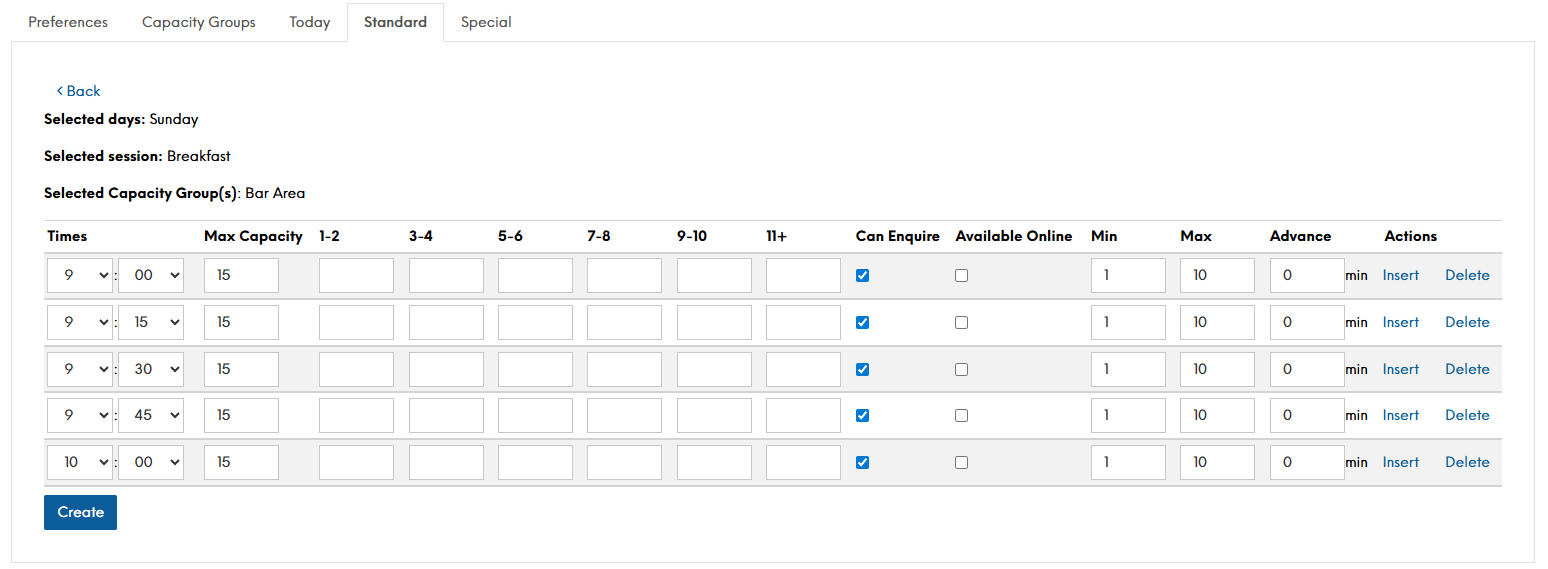
Where when editing a capacity group to add timeslots many of the fields display in red, here the timeslots are pre-populated. You now only need to tweak the timeslots as needed, or simply click save changes
-
-
Click Create
Once saved, you will be taken back to the Standard Page with a green message displaying to state "Time slots created successfully"