Preferences
The Preferences tab is used to manage time slots displayed to customers when they book tables online and when you are making reservations. Once you've bulk created time slots, you can edit by weekday and, if applicable, session.
The Preferences tab, after initial setup, is not often needing any further amendments.
When your site is first set up, the person(s) responsible for building your site will define these settings either on your behalf, or with you when you undertake training.
Preferences Topics
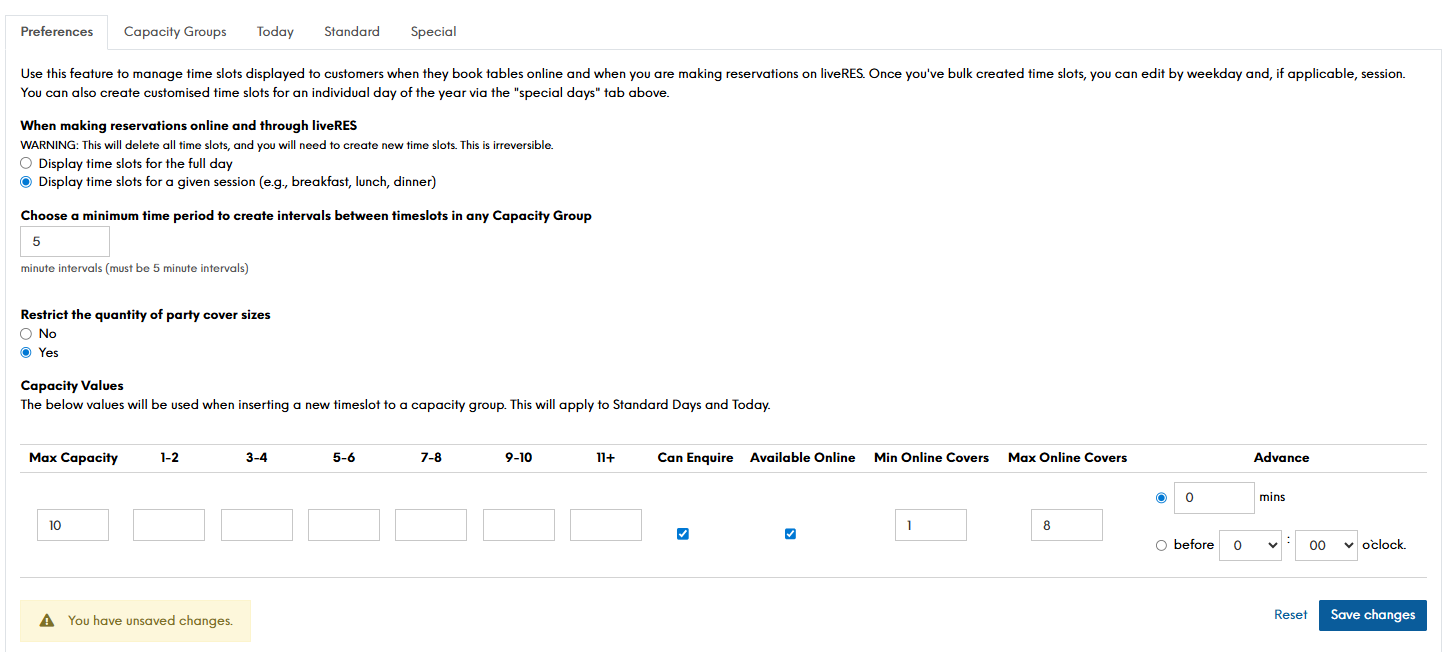
Defining Preferences
Follow these steps to set up Preferences:
-
Select whether you want to:
-
Display time slots for the full day OR
-
Display time slots for a given session (e.g., breakfast, lunch, dinner)
WARNING: If you have any timeslots previously configured, making a change between option will delete all time slots, and you will need to create new time slots. This is irreversible. -
-
Define a minimum time period to create intervals between timeslots
The majority of configurations are done in a 15 minute interval. -
Select Yes or No as to whether you want to restrict the quantity of party cover sizes
Selecting Yes will show in the summary view below the additional columns whereby you can limit the quantity of bookings made by party size. Selecting No will simply not show the option -
Define Capacity Values
The below values will be used when inserting a new timeslot to a capacity group. This will apply to Standard Days and Today.
Within the below image, the max capacity is set to 10 covers, the can enquire is set to yes, along with the available online etc. When creating a new line of capacity within standard days, today or even additional capacity group, these values will pre-populate
-
Click Save Changes