Occupancy Closure
Occupancy Closure Topics
Overview
Occupancy Closures are designed to allow hoteliers to automatically close a Rate Plan when the occupancy of the hotel is within a set range. To set up an occupancy closure you need to edit your rate plan.
Click on the Rate Plans page. To edit a rate plan you can either, click the hyperlinked name or the edit pencil in the Actions Panel.

Occupancy Closure Configuration
Occupancy Percentage Closures is found in the Configuration section of the Rate Plan edit lightbox.
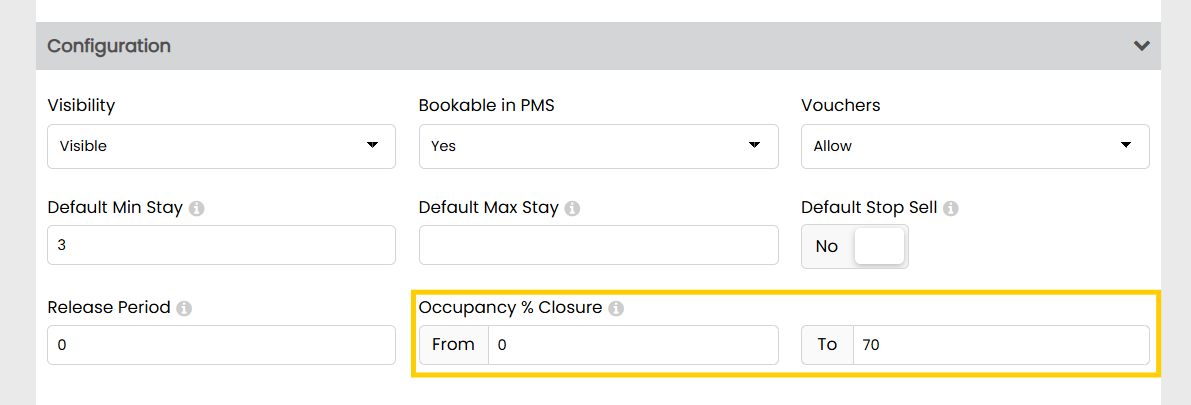
The values that you enter into the From and To fields will dictate when the Rate Plan changes from Open to Closed.
In our example, the rate plan will open when the Occupancy in the hotel is between 0% and will Close when the Occupancy reaches 70%.
How will this display in the Grid?
Occupancy Percentage Closures are actually just automated Stop Sells that apply to individual rate Plans.
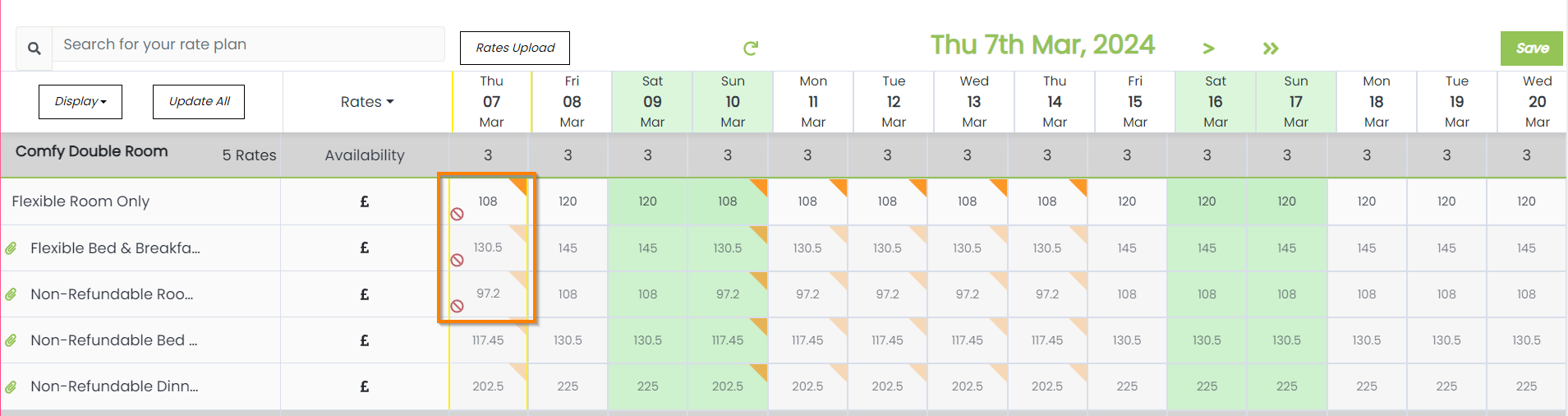
When you view the Rates and Restrictions Grid, any Occupancy Percentage Closure will simply display with a Stop Sell icon on the days where this has been applied.
If you have set up an OTA rate which only supplies your online channels, these Stop Sells will also be sent out via RDX Siteminder as you would expect if a Stop Sell were added manually.