The Guest Portal enables guests to manage their booking online and, where required, submit pre orders in advance of their visit. There are two versions of the portal available, each offering different layout options to suit your operational needs and preferred presentation. In addition, the portal can be customised using Cascading Style Sheets CSS, allowing it to integrate seamlessly with your website and maintain a consistent look and feel that reflects your brand identity.
Guest Portal Topics
Applying a CSS Link
Follow these steps to add a CSS Link:
-
For the required Company click Edit
-
In the CSS Link field, enter the CSS URL
-
Click Save Changes
Enabling Functions
Follow these steps to enable functions:
-
For the required Company click Edit
-
Update the required settings as needed
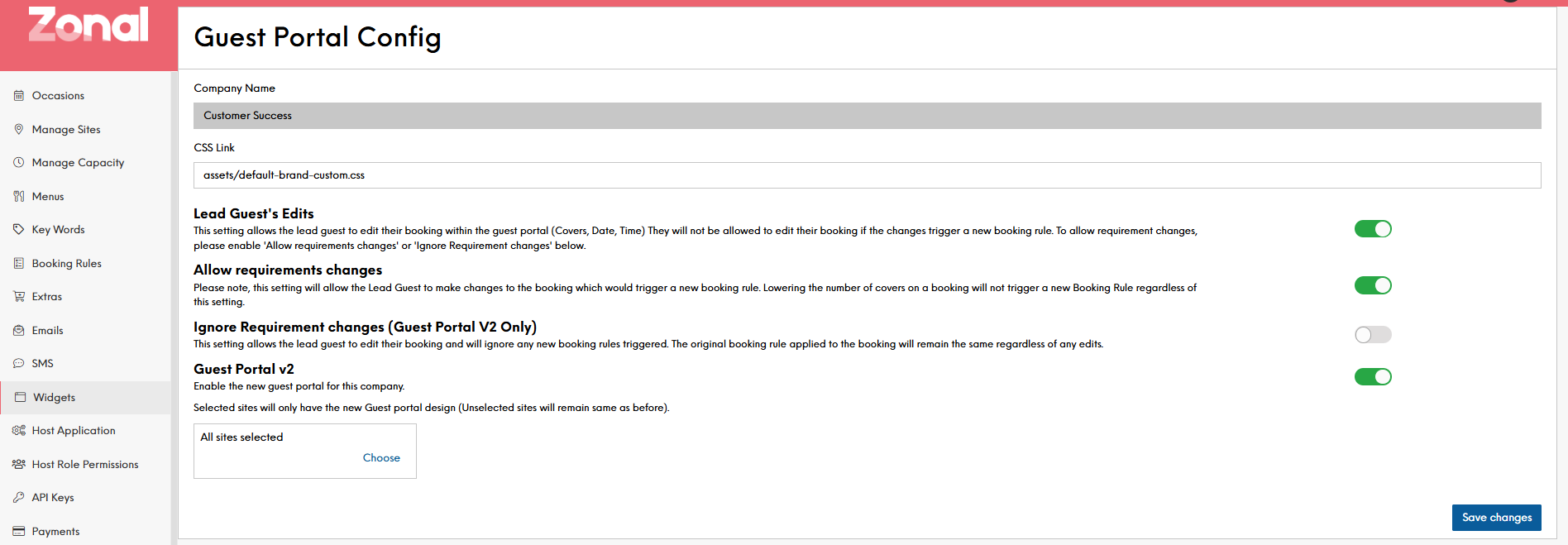
Toggle Description Lead Guest's Edits
This setting allows the lead guest to edit their booking within the guest portal (Covers, Date, Time) They will not be allowed to edit their booking if the changes trigger a new booking rule. To allow requirement changes, please enable 'Allow requirements changes' or 'Ignore Requirement changes' below
Allow requirements changes This setting will allow the Lead Guest to make changes to the booking which would trigger a new booking rule. Lowering the number of covers on a booking will not trigger a new Booking Rule regardless of this setting
Ignore Requirement changes (Guest Portal V2 Only)
This setting allows the lead guest to edit their booking and will ignore any new booking rules triggered. The original booking rule applied to the booking will remain the same regardless of any edits
Guest Portal v2 Enable the new guest portal for this company
-
Click Save Changes
When enabling or changing the available options to the Guest Portal, these changes will only take effect on new bookings. Any existing bookings will remain on the version applied at the time of booking.