Reporting Extras
When using Extras, and wanting to report on these, it can be found in the Events Host. This report can be found in “Reports” tab, under the “Reporting Categories” drop down.
Reporting Topics
Accessing the Extras Report
Follow these steps to run the extras report:
-
Select Extras from the Reporting Categories drop down
-
Select the Start Date
-
Select the End Date
-
Click Get Report
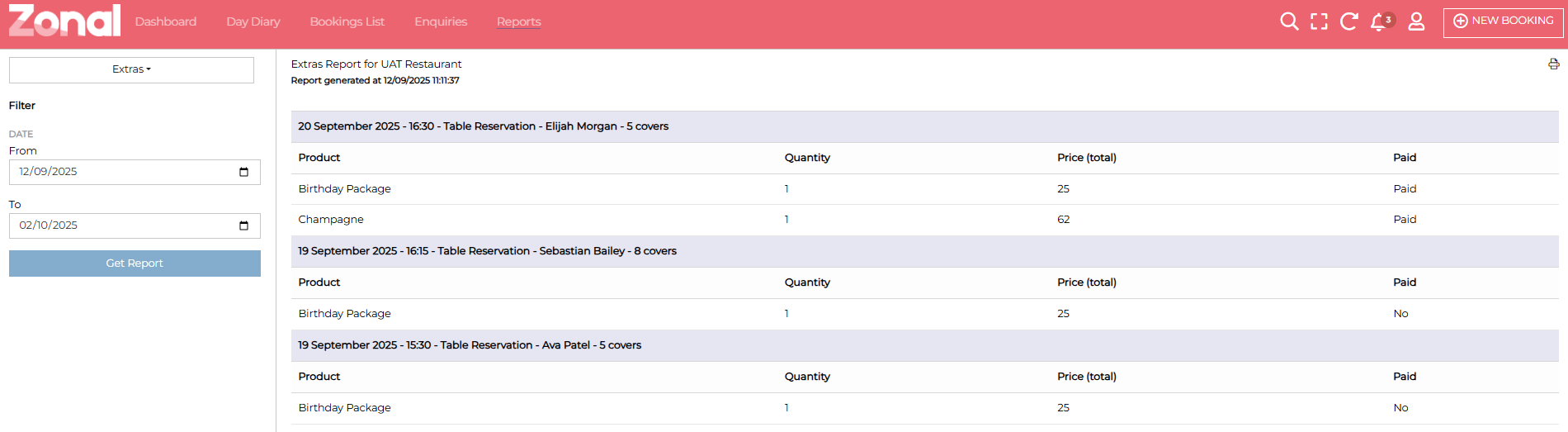
Below is an example Extras report. Within the below example you can see the name of the booking, booking size along with the date and time. It will also state if the guest had paid for their extras.
Printing an Extras Report
Follow these steps to print an extras report:
-
At the top right of the screen, you will see a printer symbol. Click the printer symbol
The print preview will display. Amend as you require
-
Click Print