Settings
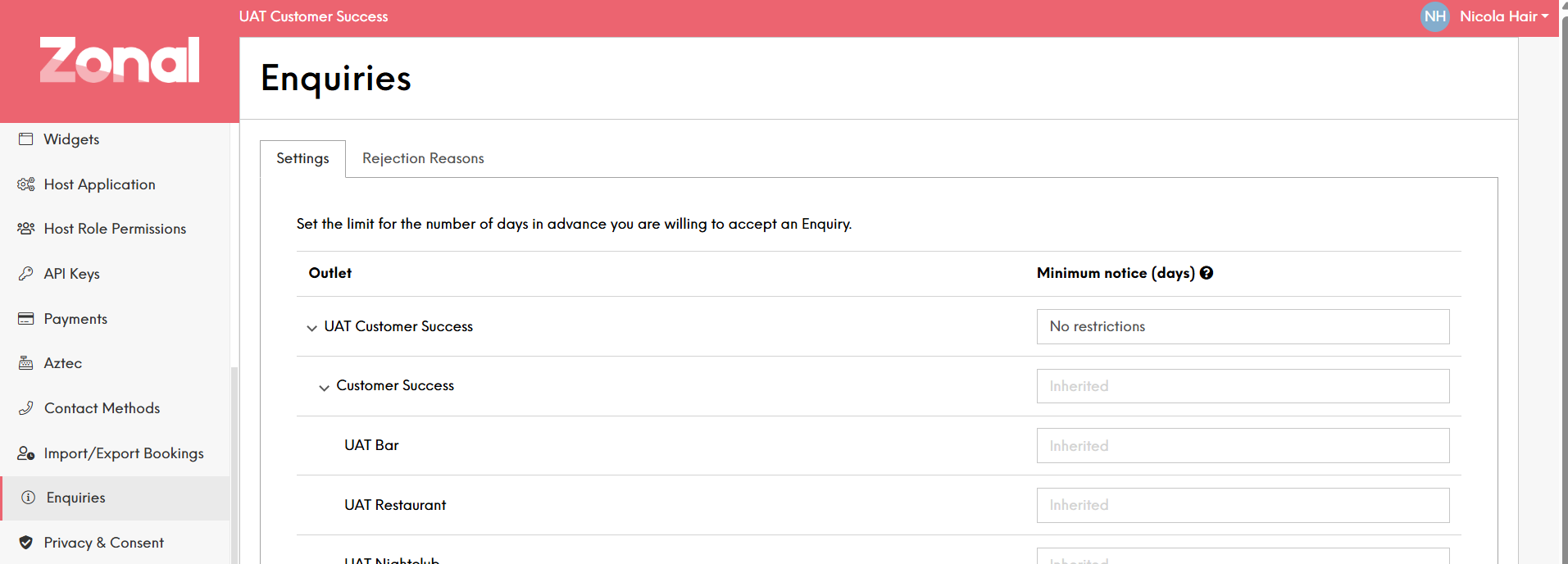
The enquiry settings function allows configuration to determine the number of days in advance enquiries can be made.
Minimum Notice Topics
Configuring Enquiry Settings
If you want to allow enquiries for timeslots on your table bookings, you can set the minimum notice period for X days in the future so that people can not enquire for the same day.
You can set the minimum notice at either Estate, Company or Site level and they can be different for each if needed. This sets the number of days in advance that a customer can enquire about a booking. For example if you didn’t want to take enquiries for same day bookings you could set the minimum notice to 2 days which would cover today and tomorrow.
| Option | Description |
|---|---|
| Outlet |
Hierarchy of the estate to allow definition of enquiry settings at estate, company or site level, setting at estate or company level will be inherited |
| Minimum Notice |
Here you can define the number of days an enquiry can be made in advance 1 day indicates one calendar day and not always 24 hours. Setting the day to 1 means that you will not accept enquires for today but will accept an enquiry for anytime tomorrow No Restriction - enquiries can be taken any time Value 1-999 - the number of days prior to a booking date to prevent new enquiries being made |