SPF & DKIM Setup
The Sender Policy Framework (SPF) Record is used to confirm that we (Zonal) have permission to send using your domain and we are not spoofing messages from your organisation.
Definition of Spoofing: ‘The act of impersonating or masquerading as a person or organisation’ ISPs/IEPs monitor sends and will recognise that we are sending out from a domain which is not our own. They will then check the SPF record of the domain. As long as this is pointing back to our platform, messages will be authenticated. Without this, they will assume we do not have consent and will block most, if not all messages.
Zonal’s products are responsible for sending a large number of emails per day on behalf of customers for products like order confirmations in iOrder Platform to booking confirmations in Bookings.
As you may or may not be aware, late last year Google and Yahoo announced new requirements for what they define as “Bulk Senders”, which is defined as anyone who sends more than 5,000 emails per day, and will go into effect in February 2024.
One of the key headlines from their announcements is the following:

Spoofing Topics
Examples
When you send an email it has a to: address and a from: address. You can see this in outlook. There is a separate from you can't see called the envelope mail from, or RFC5321 mail from. For most email that doesn't set a different return path of a bounce address this normally has the same value as the from address you would see in outlook (the RFC5322 from address).
If this is all that existed, you could send email as anyone to anyone ("spoofing"):
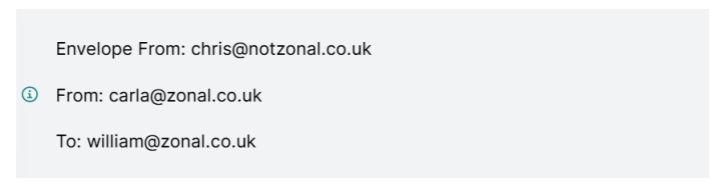
In the above example William would think they received an email from Carla. A user could send this from any email server they wanted.
There are various things that have been introduced to stop this, such as:
-
Setting up an SPF Record
-
Setting up a DMARC
-
Setting up a DKIM
Continue reading the below to find further guidance and information for each of the options.
Setting up an SPF Record
When a SPF record is in place, Internet Service Providers can verify that a mail server is authorised to send emails for a specific domain. A made-up example may look like this:

Let's assume this is the SPF record for notzonal.co.uk. In the example above the receiving mail server (the mail server for "william@zonal.co.uk" which is the IP addresses found in the MX records in zonal.co.uk's DNS) receives the email.
The receiving mail server (zonal's) will look at this message and perform an SPF check. The key point here is that it will perform a DNS lookup on the domain in the envelope from (the from you don't see in outlook) to check SPF. In this case zonal.co.uk's mail servers will check the SPF record for notzonal.co.uk and find the record above.
As long as I send my email from my email server on the IP address 212.111.2.32 then this will pass SPF.
Setting up DMARC
DMARC stands for Domain-based Message Authentication, Reporting & Conformance. DMARC enables senders to specify how their emails should be handled if they fail legitimacy checks. This protects both senders and recipients from email fraud like spoofing, spamming, and phishing.
A very simple DMARC policy would look like this:

The DMARC policy that is checked is the one in the from address that you see in outlook. In our example:
It will be zonal.co.uk's DMARC policy that is checked (_dmarc.zonal.co.uk) because the email looks like it is from carla@zonal.co.uk.
The DMARC policy can have three actions: p=none, p=quarantine, p=reject. This tells the receiving mail server what to do with the email if it doesn't "pass" DMARC. In this example it would be zonal.co.uk's own mail servers checking it's own DMARC policy.
We have made a DNS query to get the DMARC policy so we know what to do if it fails - but what are we actually checking to know if it "passes" or "fails"?
To pass DMARC the email has to have alignment in either SPF or DKIM.
SPF is aligned when the envelope from and 'normal' from address are aligned:
Envelope From: carla@zonal.co.uk
From: carla@zonal.co.uk
To: william@zonal.co.uk
This means the receiving mail server will check the SPF record for the from address and we cannot spoof the email anymore without being allowed (our IP has to be in the SPF record).
Setting up DKIM
DMARC uses DomainKeys Identified Mail (DKIM), DKIM is a method of email authentication that is like a digital signature for emails. It helps ensure that emails you receive haven’t been tampered with and are actually from the sender.
It is possible for an email to be changed without the recipient knowing it. If an email is sent and it (for some reason) travels via an email server owned by a third party along the way, they could change the email's contents. To stop this we need to verify that the email that is received is the same email that was sent from the original email server.
To do this we have DKIM: each email has a unique DKIM signature, it is generated by signing the email with a private key. This signature is checked to make sure the mail is the same.
The DKIM signature sent out contains a selector and a domain that is used by the receiving email server to look up the public key that match the private key used to sign the email.
Back to our example, this time with a DKIM signature (this is also hidden from view in outlook)
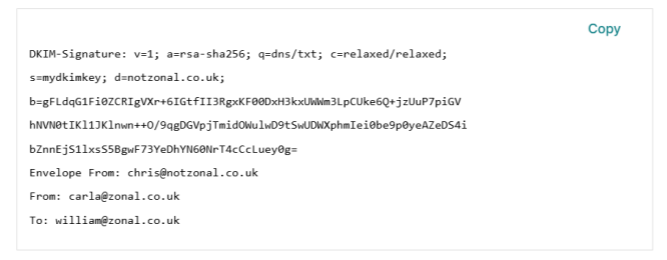
When Zonal receives this email it will check DKIM, it does this by doing a DNS lookup much like checking SPF. The record it will check is the one stored at <selector>._domainkey.<domain>. This is the s= and d= part in the DKIM signature.
In this example it will check for a DNS TXT (plain text) record at: mydkimkey._domainkey.notzonal.co.uk
It will find a public key here. This public key will be valid against the signature (FLdqG1Fi0ZCRIgVXr+6IGtfII3R..) that was signed by the private key.
Key point: the DKIM key can be hosted anywhere that is defined in the DKIM signature has doesn't have to match the envelope from or the "normal" from that you see in outlook.
FAQs
What actions need to be taken?
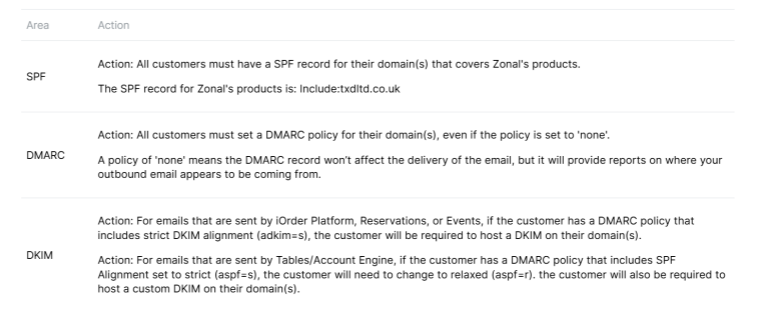
The actions that are needed will depend on your current setup and configuration of your domain(s). The actions involve changes to your domain(s)' public DNS, which Zonal do not have access to.
The following guide will outline each email authentication practice, and the steps needed. If you are unfamiliar with your current setup, please speak to your Zonal Account Manager, who will be able to let you know what configuration we can see.
How do I know if I am classed a bulk sender or not?
Google defines a bulk sender as any email sender that sends close to 5,000 messages or more to personal Gmail accounts within a 24-hour period. This limit includes all emails sent from the same domain and any emails that are sent outside Zonal's products, such as email marketing or other email communications.
What happens if I don’t implement these changes?
It is very likely that any email sent to a guest with a Gmail or Yahoo mail account will be classified as spam.
Which products are affected by these changes?
Any Zonal product which sends an email to a guest on behalf of a customer, such as Bookings, Loyalty, iOrder Platform.
Testing
You can use https://mxtoolbox.com/SuperTool.aspx select TXT look up.