Invoice Configuration
An invoice is a formal document sent to a customer to request payment for goods or services. It typically includes details like seller and buyer information, a unique invoice number, dates, item descriptions, amounts, and payment terms. The invoice templates let you set up this structure once so every new invoice you create is consistent, professional, and accurate.
Invoice Configuration Topics - Part 1 Admin
Create an Invoice Template
Follow these steps to create an invoice template:
-
Click Add Invoice Template
-
Enter a Template Name
-
Enter a Description
This field is optional and has 200 character limit. Use this field to add any description for a given invoice template. -
Enter your Company Name
-
Enter your Company Number
-
Enter your VAT Number
-
Enter your Estate, Company or Site Address
These fields are optional and have a 100 character limit. These fields are used to display companies’ address and details on the invoice -
Enter a Footer Body Content
This field is optional and has 2000 character limit. This field can be used to set a footer note that appears on the PDF invoice. -
Enter required VAT Rates
-
This field is used to set one or multiple VAT rates that can used when creating an invoice on Host App
-
This field accept 2-decimal points only, for example 20% or 17.50%
-
Users can edit or remove VAT rates any point of time
-
This is a mandatory field
-
-
Select required Companies or Sites
-
Click Save Changes
Edit an Invoice Template
Once an invoice template saved, the estate admin user can edit the template.
Follow these steps to edit an invoice template:
-
In the Actions column, click Edit
The pre-filled invoice is displayed you can make any changes to the invoice template
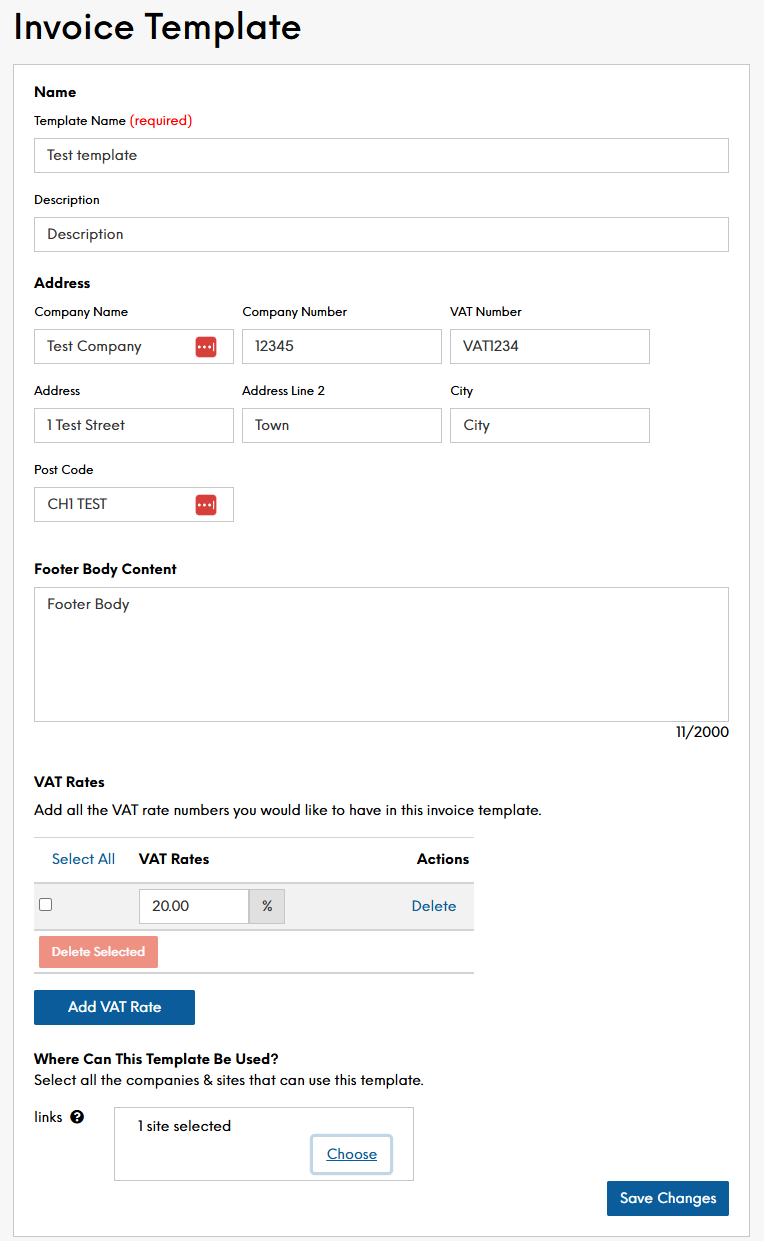
-
Make the required changes
-
Click Save Changes
Conditions of ‘editing’ an invoice template:
-
Any edits made to an invoice template are reflected on the Host App → Invoice
Delete an Invoice Template
Follow these steps to delete an invoice template:
-
In the Actions column, click Delete
A prompt will display asking: "Are you sure you want to delete this Template? This will remove it from all setup invoices." -
Click Yes, Delete
There is no way to recover a deleted invoice template. If deleted in error, you will need to create a new invoice template