Initialise Threads
Before a full stock audit can be carried out, all threads must be initialised. This means that their initial opening count values need to be entered as the starting point for the stock system.
Initialise Threads Topics
Depending on the thread setup there are two options to this process, the first is to enter all the values manually the second is to import from another initialised thread.
Option 1
If there is a master / subordinate thread configuration initialising the master thread will also automatically complete this process fro the subordinate thread.
Follow these steps to initialise the thread:
-
Select the required Product Division
-
Select the required Thread
-
Click Initialise Thread
-
Click Enter Manually
-
Enter the Open Stock value for all items and any missing Costs
Products with no stock should be set with a quantity of 0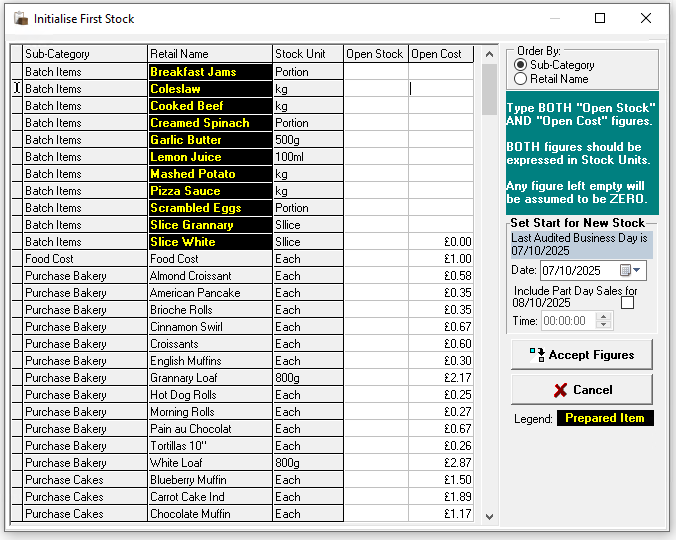
-
Set the required Start Date for the New Stock
If the stock was being initialised part way through the current day select the check box and enter the required time
Care should be taken when selecting the date to ensure this matches to any new site openings / applicable sales reduction on point of sale terminals -
Click Accept Stocks
-
Click Yes to confirm the initialisation
-
Click OK
The stock thread will now be ready to complete full stock audits, line and spot checks.
Option 2
If a new thread has been added or there are two or more normal threads for the same product division values can be taken from an accepted stock.
-
Select the required Product Division
-
Select the required Thread
-
Click Initialise Thread
-
Click From Another Thread
-
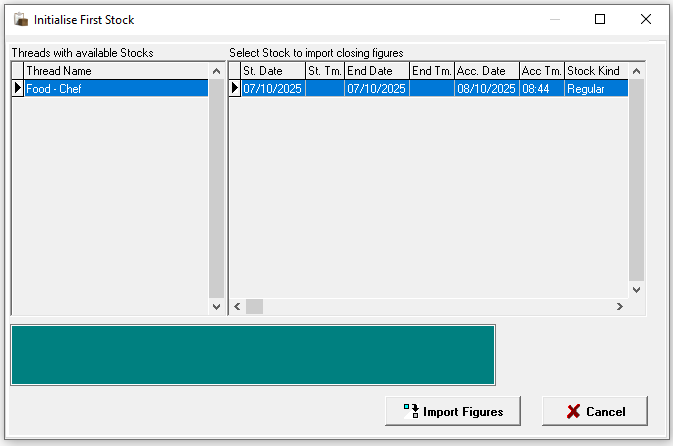
Select the Thread and Stock to Import
-
Click Import Figures
-
Click Yes to proceed with the import
-
Click OK
The stock thread will now be ready to complete full stock audits, line and spot checks.
Threads with Holding Zones
When initialising threads with holding zones, the process should be completed using either option 1 or option 2 for the total onsite stock. Stock will then need to be transferred from the zone designated as the purchase zone, as the thread initialisation assigns all site stock to this zone.