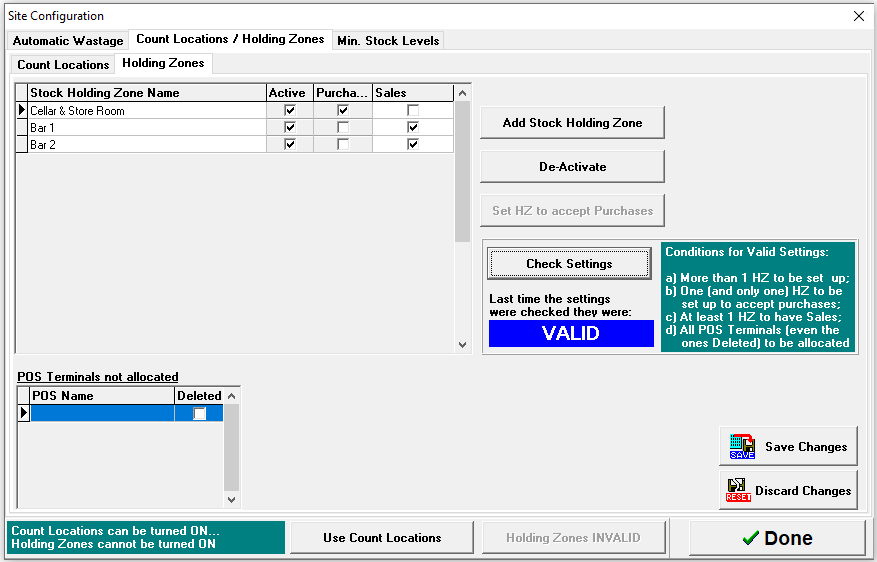
Holding Zones offer an enhanced stock taking function by allowing each outlet within a site to be counted separately. This enables the generation of detailed stock results, providing greater insight and control over reporting and stock management. Stock is initially received into a designated Purchase Zone through delivery purchases, and products are then transferred to individual zones to update stock levels accordingly. A consolidated stock result is also produced for the entire site.
Holding Zone Topics
Managing Holding Zones
Follow these steps to add holding zones:
-
Click Add Stock Holding Zone | update the Holding Zone Name shown in the table
Continue adding all of the required holding zones
-
Select the required Zone to accept purchases | click Set HZ to accept Purchases
When deliveries are added into the system the zone assigned to accept purchases will receive all goods delivered -
Select for all other zones the Sales check box
If required the zone that accepts purchases can also be a sales zone -
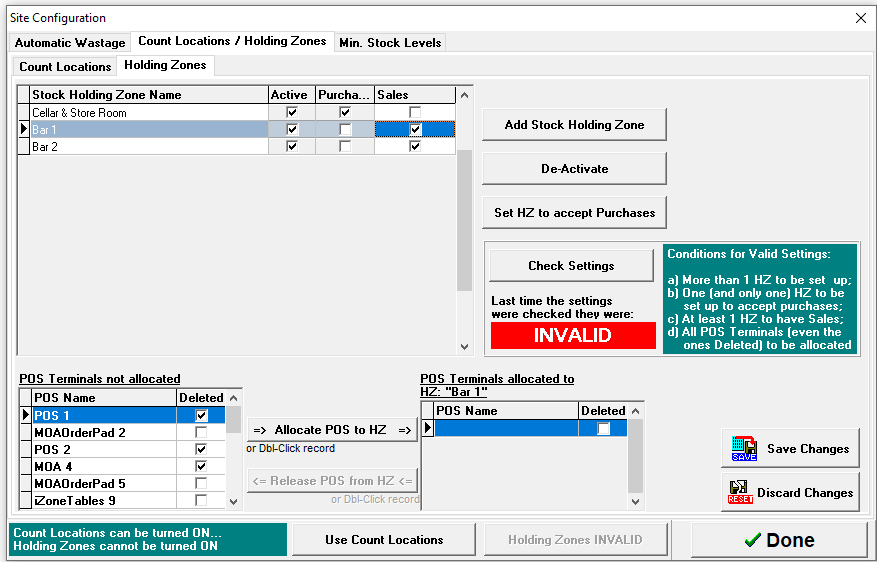
For each holding zone configured for sales a terminal must be allocated, from the POS Terminal Not Allocated section select a terminal | click Allocate POS to HZ
-
All terminals (including any deleted) must be allocated to a required zone
-
Click Check Settings if there are invalid settings the setup cannot be completed
-
Ensure all terminals are allocated
-
Ensure there is a holding zone with purchases
-
-
-
Click Save Changes