Cancellation Report
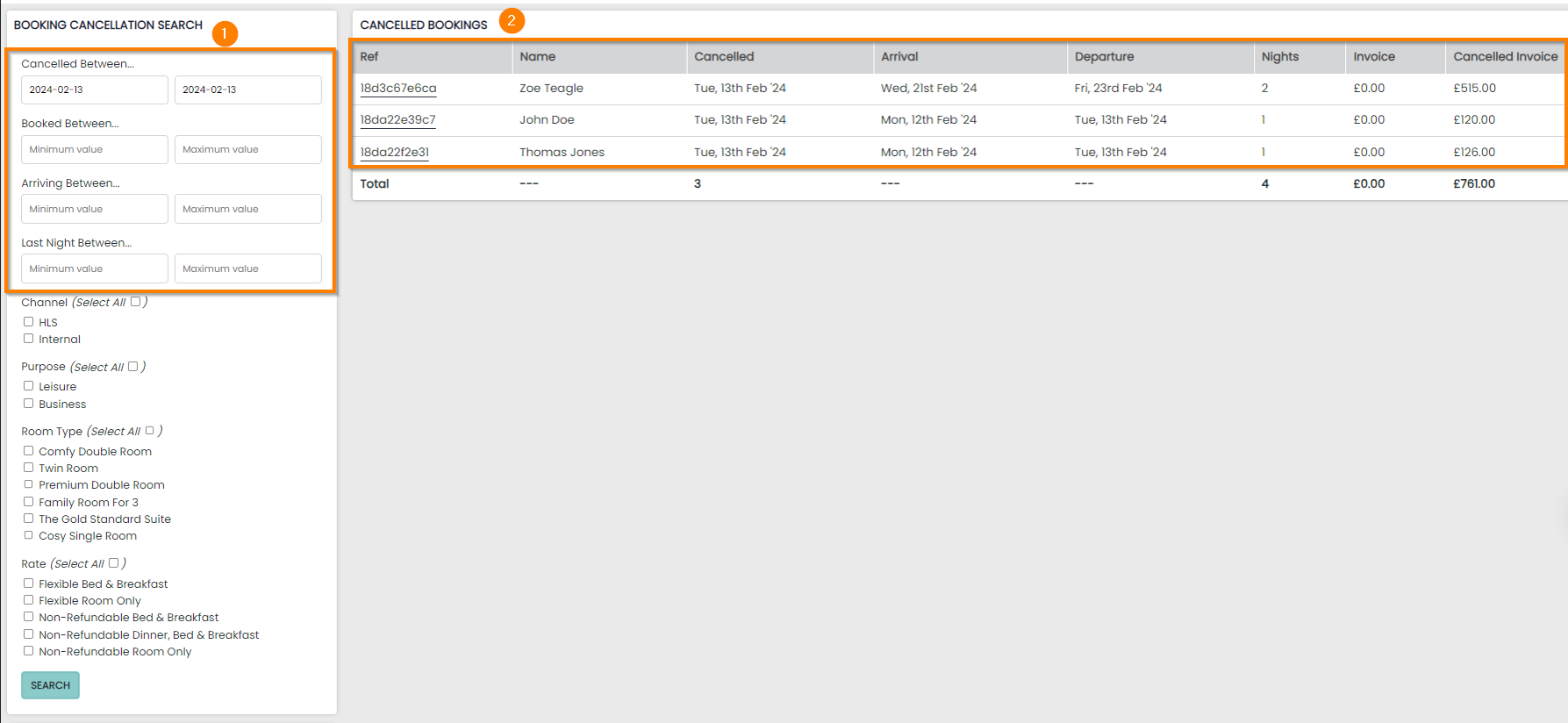
The Cancellations Report gives a quick, focused snapshot of all bookings that were cancelled in a chosen period, helping you track lost revenue, spot trends, and understand why cancellations occur. It brings key details together in one place so you can review activity efficiently and keep your operational and financial records accurate.
Cancellation Report Topics
Features
1 The report is primarily generated by the following date ranges:
-
Cancelled Between – the date the cancellation was actioned
-
Booked Between – the date the Booking was created
-
Arriving Between – the date of the earliest arrival on a booking
-
Last Night Between – the date of the latest night stay on the booking
2 The results panel will display any cancelled bookings with a hyperlink to the Booking or the Guest Profile, followed by the primary dates you have used to search.
The final 3 columns will display the reservation specific information:
-
Number of Nights – the number of nights on the Reservation when cancelled
-
Invoice – the current cost of the reservation. This will include any added purchases in the form of cancellation charges etc
-
Cancelled Invoice – the cost of the reservation when it was cancelled e.g a room at BB rate for £150
Cancellation Totals
The cancellations report will show a maximum of 20 results per page. However, the total results shown at the bottom of the table will always display the totals of each column.
The following data is displayed:
-
Total cancelled reservations from your search
-
Total number of nights on your cancelled reservations
-
Total balance on the reservations before they were cancelled
