Activity Report
The Activity Report is designed to show all activity taking place on the selected date or date range.
Activity Report Topics
Navigate to Main Navigation Bar → Reports → Activity Report
Report Details
It is located within the Occupancy Reports but is also displayed on the Dashboard as it is very helpful for the day to day management of the property.
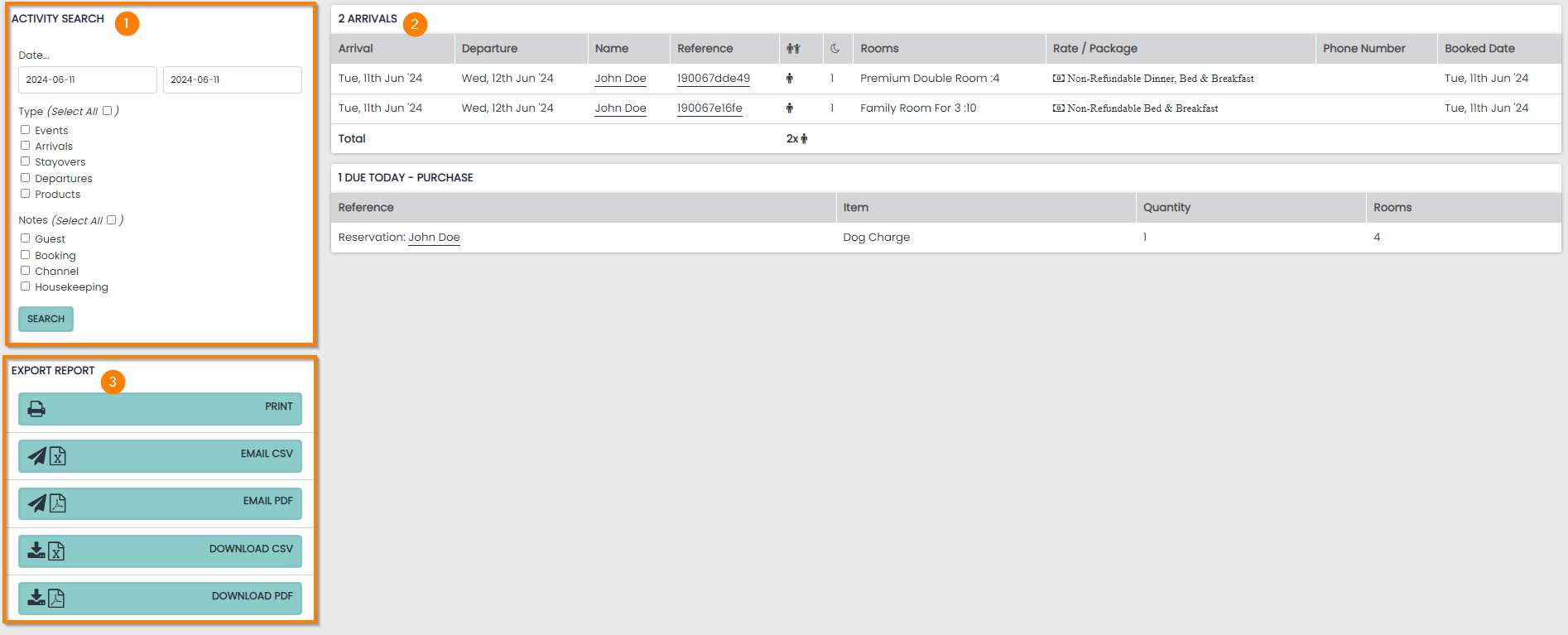
The report is divided into displaying the following data and this can be filtered within the Search Panel:
- Events - conferences taking place on the selected dates
- Arrivals – reservations with an arrival date on the selected dates
- Stayover – reservations that arrival and departure dates span the selected dates
- Departures – reservations with a departure date on the selected dates
- Products – any Products that are due on the selected dates
Activity Report features to assist with day to day hotel management:
1 Date search and filter panel
2 Activity Panels showing
- Arrival / Departure dates
- Room Reservation labels
- Room Types and Room No. (if assigned)
- Rate Plan
- Phone number (if supplied)
- Products due and the ‘due when’ setting
- Day Before arrival
- On arrival
- Day After arrival
- Quantity of Products
3 Export Panel – Allows the report to be printed, emailed or downloaded in 2 formats