Audit Report
The Audit Report will show all changes made in the system and by which staff member.
Audit Report Topics
Navigate to Main Navigation Bar → Reports → Audit Report
Report Details
- Bookings – any changes made to a booking’s arrival, departure, status or prices will display here
- Reservations – changes made to a reservation’s dates, label, status or prices will display here
- Products – changes made to products’ posted date, price or status will display here
- Payments – any changes made to Payments or Refunds will display here
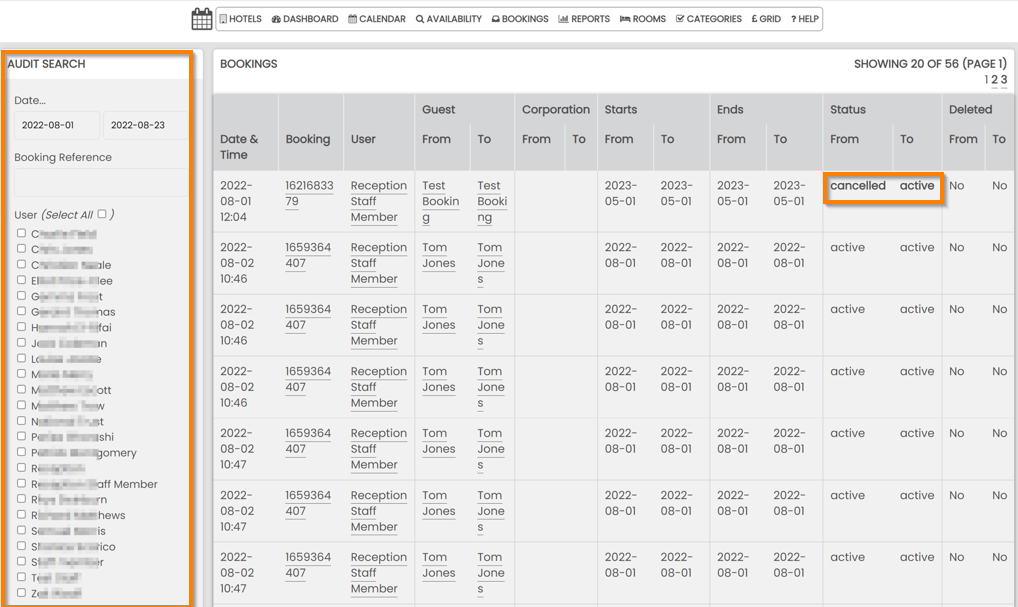
To generate results quicker, filter this report using:
- A date range
- A booking reference
- A staff member
All changes will be highlighted in bold. We can see here that a Booking has changed from Cancelled to Active on 01 August at 12:04.
Only Staff profiles that have been grated access to the Audit report will see this listed in their suite. If this is required, please ask your hotel manager to request this from Support