Blocks Report
The Blocks Report is helpful to view information about blocks in your hotel’s calendar. It can reveal detailed information about blocks. The report can be found by selecting 'Reports' and viewing beneath 'Occupancy Reports'.
Blocks Report Topics
Navigate to Main Navigation Bar → Reports → Blocks Report
Report Details
The Report has the following search parameters:
- Blocks Between - these are the ‘To’ and ‘From’ dates for the block search to pick up
- Type - this filter will control the return of blocks that are specific to rooms or venues
- Action - the filter will control the return of blocks that are Room Out Of Service or Reduced From Stock
- Status - this filter will control the return of blocks by status as either Outstanding, In progress, or Completed
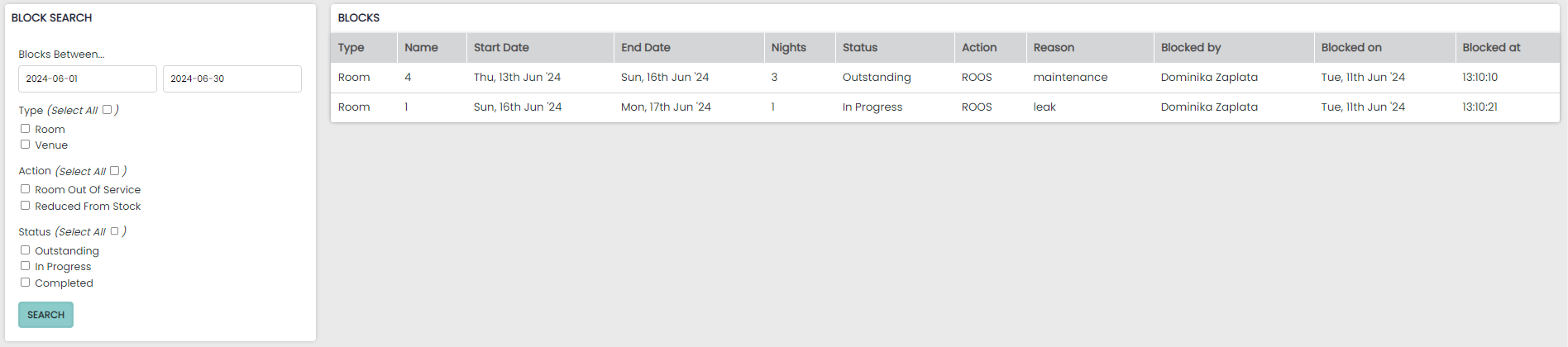
Block results are returned as a table with the following columns:
- Type – room or venue
- Name – room or venue name
- Start Date – the start date of the block
- End Date – the end date of the block
- Nights – the number of nights of the block
- Status – the status of the block either as outstanding, in progress, or completed
- Action – ROOS for room out of service or RFS for reduced from stock
- Reason – the reason for the block
- Blocked by – the person who created the block at your hotel
- Blocked on – the date the block was created
- Blocked at – the time the block was created