Pass Creator
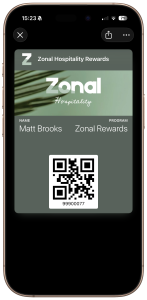 The Pass Creator setup process enables you to manage passes linked to your loyalty programs, allowing customers to add their loyalty card to their device’s wallet for quick access and easy scanning during loyalty transactions.
As part of the setup, Add to Wallet buttons can also be included in emails and on balance check widgets, making it simple for customers to save their card directly to their device.
Additional Information
Prior to creating Pass Creator templates, Zonal will create the required developer files, as well as access to the Pass Creator platform.
Please request Pass Creator developer files and access via your Zonal Account Representitive and include the following information:
-
Apple Development Account Name
-
Google Pay & Wallet Console Account Name
-
Email addresses of those who require access to Pass Creator. For those who already have access to Loyalty, please provide the Loyalty username and the existing access will be updated.
For more information and help select an option from the menu or choose from the following sections: