The first section when configuring a purchase item is the main details, this holds all of the primary information for this product type.
There are three options when adding a new purchase item:
-
Select an existing purchase item and click Add, this will automatically pre-fill various fields based on the selected item
-
Click the down arrow on the Add button, select empty purchase item, this will leave all fields blank
-
Select an existing purchase item and click Clone, this will copy all details from the previous selected item
Main Details Topics
Step 1 of 2
Completing Main Details
Follow these steps to configure this section:
-
Click Add or Clone | based on the "add option" chosen some fields will automatically be pre-populated
-
Enter the following details, Main Name | Aztec Name (update as required) | Description (optional)
-
Check or set the following fields Subcategory | Tags | Tax Rules
-
If there any item references to be added click References tab | enter a External Reference 1, 2 or 3
The external reference 1 is the new term for an Aztec Product Modelling Import / External Ref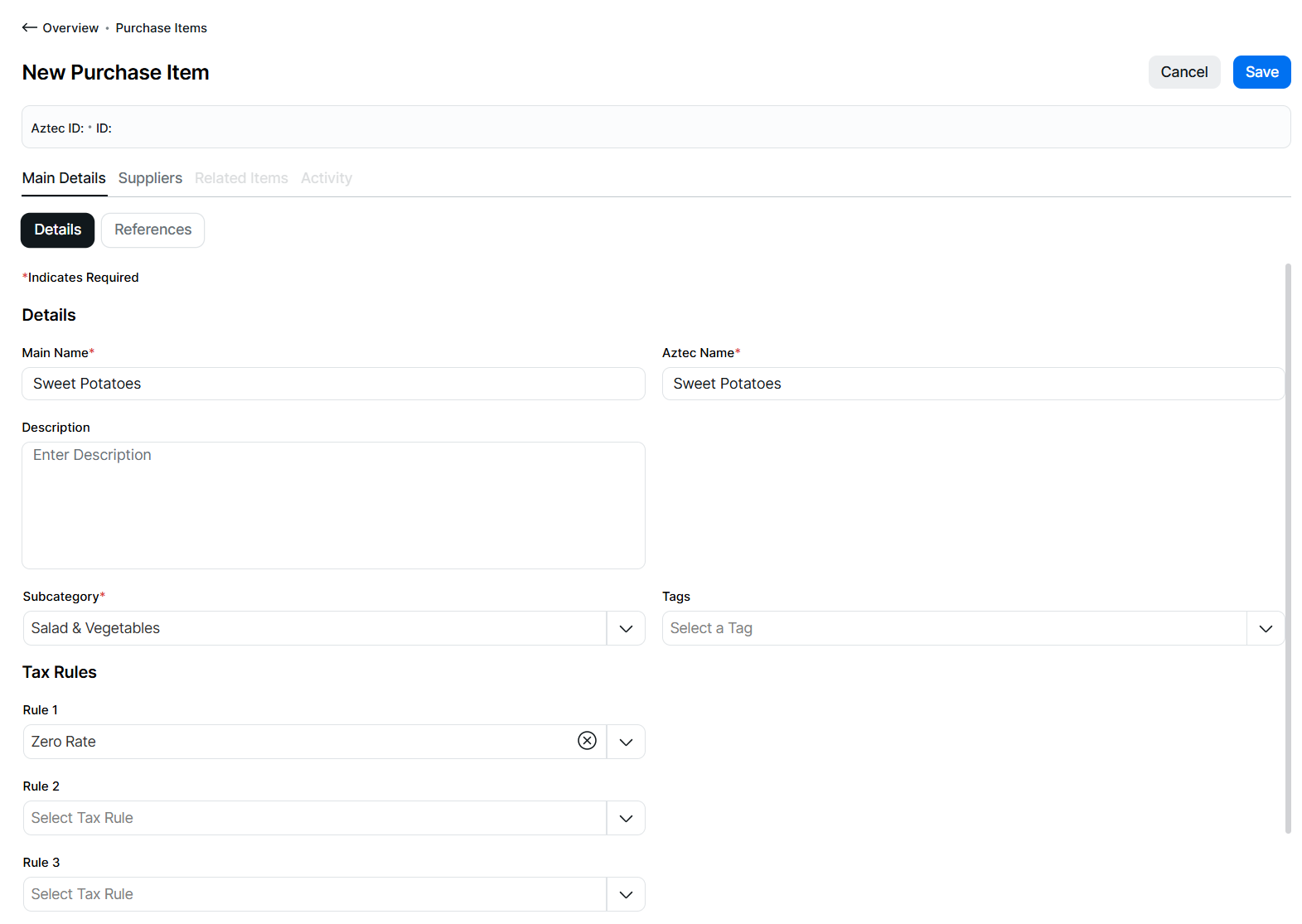
-
Click Suppliers
Field Settings & Information
Details
The details section allows you to set the names and other primary purchase item information.
| Field | Description |
|---|---|
| Main Name | Main purchase item name used across the platform |
| Aztec Name | Shorter purchase item name used by Aztec product modelling, pre-populated by entering the main name but will stop at 16 characters |
| Description | Description of the purchase item |
| Subcategory | Subcategory from the product structure |
| Tags | Product tags associated to the purchase item |
Tax Rules
The tax rules section allows you to set the 1 or more rules against the purchase item.
| Field | Description |
|---|---|
| Rule 1 | The tax rules define the tax that will be calculated when the purchase item is bought through the supply chain |
| Rule 2 | Additional tax rules for the sales item |
| Rule 3 | Additional tax rules for the sales item |
| Rule 4 | Additional tax rules for the sales item |
References
The references section allows you to set additional IDs against the purchase item.
| Field | Description |
|---|---|
| External Reference 1 | Third party / optional reference of the purchase item - 15 characters |
| External Reference 2 | Additional third party / optional reference of the purchase item - 15 characters |
| External Reference 3 | Additional third party / optional reference of the purchase item - 15 characters |