Safes
By default, one safe is always configured. Additional safes can be added as required, depending on site needs and with optional configuration settings.
Safes Topics
Adding Safes
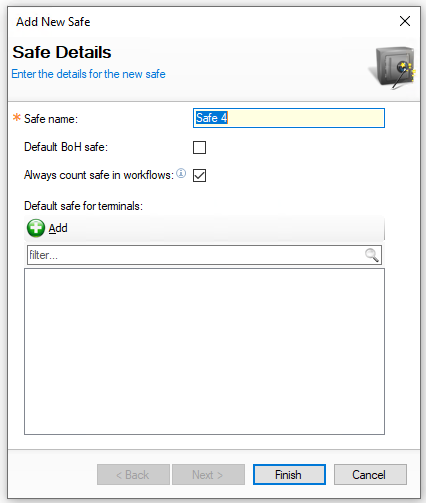
Follow these steps to add a safe:
-
Click Add
-
Enter the Safe Name
-
Set the following optional configurations
-
Default BOH Safe - when enabled this becomes the default safe for all activities
-
Always Count Safe in Workflows - when enable this safe will be expected to be counted
This setting only works when workflows have been enabled for use -
Default Safe for Terminals - this option enables point of sale terminals to be assigned to a safe, when performing declarations the monies will be automatically added to the selected safe
-
Click Add
-
Select the required Terminals from the list
-
Click OK
-
-
-
Click Finish
Removing Safes
Follow these steps to remove a safe:
-
Select the required Safe from the list
-
Click Remove
-
Click Yes to confirm the removal
If money is still in the safe you will be prevented from completing the removal and must either
-
Perform Safe Transfer to move the money to another safe
-
Enter a Banking against the safe to reduce its money
-