Viewing Receipts
It is often necessary to view or reprint a receipt from a past transaction, either for internal records or in response to a guest’s request. Several reports provide access to detailed receipt information, allowing you to locate, review, and reprint previous transactions quickly and accurately when required. Three report examples are shown below where a receipt can be viewed and printed. Typically where an Account ID column is shown in a report the receipt can be viewed.
Viewing Receipts Topics
The following reports all allow you to view receipts and follow the same process from opening and viewing the report to applying lookup filters and accessing the relevant receipt details.
Closed Accounts
Follow these steps to view a receipt using the closed accounts report:
-
Select the Transactions folder and open the Closed Accounts Report
-
Select the required Date
-
Click View Report | all closed accounts for the selected day will be displayed
-
Apply Lookup Filters to locate the required account
-
Right click on a column that will enable you to find the account, for example Table Number
-
Click Lookup
-
Select the required Table Number or other Filter Term
-
Click Apply
-
-
Right click on the Account ID | select View Receipt
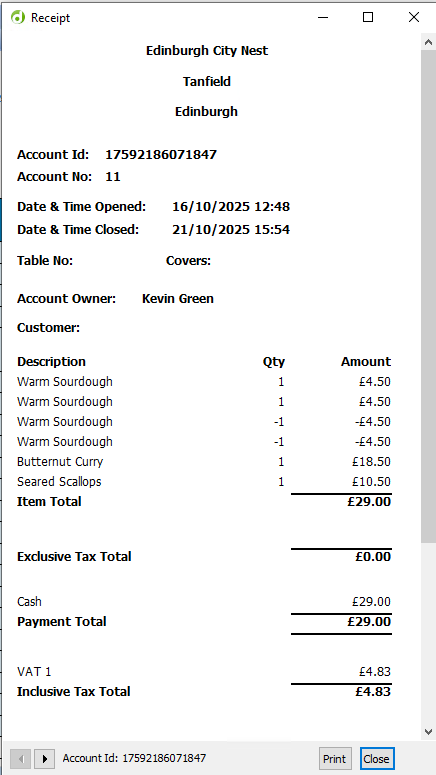
Receipt information will display all products that were added to the account including those that were corrected (they will be displayed with a minus quantity)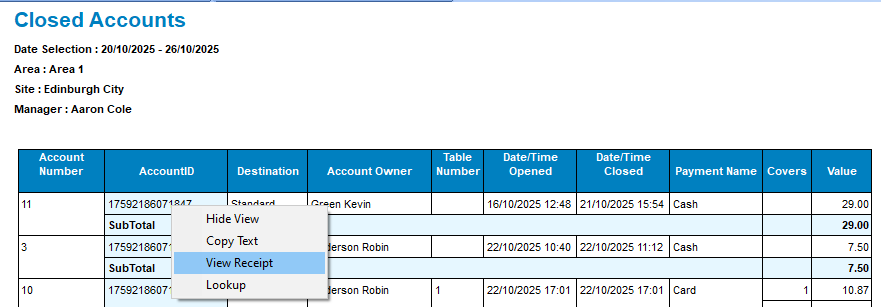
Audit Transaction Report
Follow these steps to view a receipt using the audit transaction report:
-
Select the Transactions folder and open the Audit Transaction Report
-
Select the required Date
-
Click View Report | all transactions for the selected day will be displayed
-
Apply Lookup Filters to locate the required account
-
Right click on a column that will enable you to find the account, for example Table Number
-
Click Lookup
-
Select the required Table Number or other Filter Term
-
Click Apply
-
-
Right click on the Account ID | select View Receipt
Detailed Transaction Report
Follow these steps to view a receipt using the detailed transaction report:
-
Select the Transactions folder and open the Detailed Transaction Report
-
Select the required Date
-
Click View Report | all transactions for the selected day will be displayed
-
Apply Lookup Filters to locate the required account
-
Right click on a column that will enable you to find the account, for example Table Number
-
Click Lookup
-
Select the required Table Number or other Filter Term
-
Click Apply
-
-
Right click on the Account ID | select View Receipt