Data Extracts
Loyalty data can be automatically exported each evening and securely delivered to a designated SFTP location. These files, commonly referred to as iZone Extracts, are designed for seamless integration with third-party systems or further analysis.
The Loyalty system assigns a unique identifier to transaction data within Aztec. By combining both the Loyalty and Aztec extracts, businesses can feed this enriched dataset into CRM platforms such as Airship. This integration enables the creation of a unified customer view and provides deeper insights into spending behaviour.
Loyalty Data Extracts Topics
Setting Up Loyalty Extracts
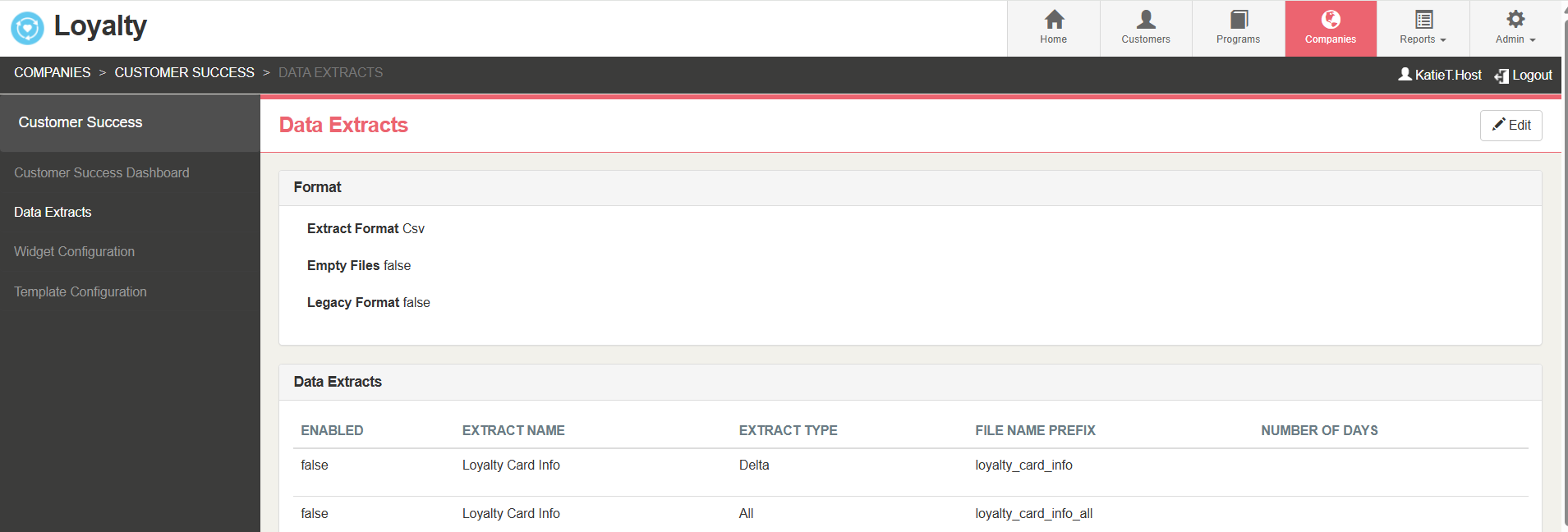
Follow these steps to set up or amend the Loyalty Data Extracts:
-
Click Edit
-
Apply the required Data Extract settings
-
Click Save
Data Extract Settings
Format Options
-
Extract Format: Choose the file format from the drop-down menu:
-
.CSV: Default system format
-
SQL Server Compatible: Removes specific characters for SQL Server compatibility
-
-
Empty Files: When selected, the system generates an empty file (with the relevant title) if no data is available. Disabled by default
-
Legacy Format: For historic reporting only. Please ignore for current configurations..
Data Extract Configuration
-
Enable Extracts: Activate extracts by ticking the checkboxes in the Enabled column
-
File Name Prefix: Each extract has a default file name prefix. Update if required
-
Expiry Extract: Contains all balances due to expire within the period specified in the Number of Days setting
Loyalty Extracts Definitions
The following data extracts are available for Zonal Loyalty
The Loyalty Card Info extract provides a list of all registered loyalty cards, grouped by company and the associated program each customer has joined.
Two file types are available:
-
Full Export – A complete list of all registered loyalty cards. This file will overwrite the previous version each time it is generated.
-
Default Naming Convention: loyalty_card_info.csv
-
-
Delta Export – A dated file containing only changes (new or updated cards) from the previous day, covering the period midnight to midnight.
-
Default Naming Convention: loyalty_card_info_YYYYMMDD_HHMMSS.csv
-
Fields
| Field Name | Data Type | Nullable | Notes |
|---|---|---|---|
| customer_id | String (255) | N | Unique identifier for each loyalty member |
| brand | String (255) | N | The Company name the customer is registered to |
| program | String (255) | N | Loyalty program name the customer is registered to |
| card_number | String (255) | N | Numerical value |
| card_status | String (255) | N | Card Status: Inventory / Activated / Suspended |
| pin | INT (32-bit) | N | Pin number associated with card (for use with balance check widget). No leading zero's |
| registration_type | String (255) | Y | Light Mobile, Light Email, Full |
| LastModified | Date/Time | N | The date the record was last modified |
| Customer_Guid | Char (36) | Y | Unique identifier customer GUID supplied by Platform Services |
| Company_Guid | Char (36) | Y | Company GUID that the customer is registered to |
| first_use | Date/Time | Y | First time a card was used on POS (It must involve a purchase) |
| first_use_employee_id | Char (20) | Y | Employee ID responsible for capturing card’s first use |
| first_use_site_aztec_id | Char (40) | Y | Aztec Site ID of which first use was captured |
| first_use_site_id | Char (20) | Y | Loyalty Site ID of which first use was captured |
| first_use_site_guid | Char (36) | Y |
Loyalty Site GUID of which first use was captured |
The Loyalty Balances extract provides the points or currency balances for each loyalty card account.
Two file types are available:
-
Full Export – A complete list of balances for all registered cards. This file will overwrite the previous version each time it is generated
-
Default Naming Convention: loyalty_balances_all.csv
-
-
Delta Export – A dated file containing only balance changes from the previous day, covering the period midnight to midnight
-
Default Naming Convention: loyalty_balances_YYYYMMDD_HHMMSS.csv
-
Fields
| Field Name | Data Type | Nullable | Notes |
|---|---|---|---|
| card_number | String (255) | N | Numerical value |
| value_type | String (255) | N | Value Type set in Loyalty. Currency / Points / Custom value |
| value_type_code | String (255) | Y | Code of the value type if applicable. e.g. An Aztec entity code, discount ID etc |
| value_type_description | String (255) | N | Description of the value type |
| balance | Decimal (18,2) | N | Balance of value type remaining. If null, balance may be redeemed against account an unlimited amount of times |
| LastModified | Date/Time | N | The date the record was last modified |
The Loyalty Transactions extract contains all loyalty transactions from all sites within a company for the previous day, covering the period midnight to midnight.
File type:
- Delta Export – A dated file containing only transactions from the previous day, covering the period midnight to midnight.
Default Naming Convention: loyalty_transactions_YYYYMMDD_HHMMSS.csv
Fields
| Field Name | Data Type | Nullable | Notes |
|---|---|---|---|
| transaction_id | String (255) | N | Loyalty Unique Transaction ID |
| transaction_date_time | Date/Time | N | |
| transaction_description | String (255) | N | Type of loyalty transaction that has been processed. Values - Credit, Debit, Adjustment, Void and Expiry |
| transaction_amount | Decimal (18,2) | N | Amount of points/currency accrued, number of prizes debited etc. |
| organization_id | String (255) | Y | Legacy field |
| loyalty_card_number | String (255) | N | Maps to card_number in current automatic customer file |
| loyalty_value_type | String (255) | N | This will be the reward type in the transaction Spend related to Total Spend Currency, Visits and Points |
| loyalty_value_type_code | String (255) | Y | Code of the item that is being tracked and can be any value. The ID of the ‘loyalty_value_type_description’ (i.e. Total Spend, 17, Points, 13, Visits, 16) |
| loyalty_value_type_description | String (1024) | Y | Description which was given to the reward/item and links to the type_code. Value - Points, Currency, Spend, Visits, Aztec Product Description, |
| loyalty_account_value_type_balance | Decimal (18,2) | N | The balance of the value type (Currency / Points / Custom) as a result of the transaction for the specifed value type. |
| aztec_id | String (255) | Y | Aztec site ID |
| aztec_ticket_id | String (255) | N | Unique Aztec reference relating to transaction |
| sub_total_amount | Decimal (18,2) | Y | Total payment amount posted from Aztec to iZone for the ‘closed’ epos account. |
| organization_guid | Char (36) | N | Company or site GUID from Platform Services where the transaction was instigated |
| LastModified | Date/Time | N | The last time the transaction was modified. |
The Customer Metrics extract provides spend and visit data for each customer loyalty account across various reporting periods
Two file types are available:
- Full Export – A complete list of balances for all registered cards. This file will overwrite the previous version each time it is generated
Default Naming Convention: customer_metrics_all.csv
- Delta Export – A dated file containing only changes from the previous day, covering the period midnight to midnight
Default Naming Convention: customer_metrics_YYYYMMDD_HHMMSS.csv
Fields
| Field Name | Data Type | Nullable | Notes |
|---|---|---|---|
| customer_id | String (255) | N | Unique identifier for each loyalty member |
| life_spend | Decimal (18,2) | Y | Total spend by customer. Loyalty number must be assigned to the account |
| 7_day_spend | Decimal (18,2) | N | Total spend by customer over previous 7-day period. An export generated on the 10/10/2014 would capture total spend between 03/10/2014 00:00:00 and 09/10/2014 23:59:59 |
| 30_day_spend | Decimal (18,2) | N | Total spend by customer over previous 30-day period |
| 90_day_spend | Decimal (18,2) | N | Total spend by customer over previous 90-day period |
| life_visits | INT (32- bit) | Y | A visit is counted as one closed Aztec account at a location ID |
| 7_day_visits | INT (32- bit) | N | Total visits by customer over previous 7-day period. An export generated on the 10/10/2014 would capture visits between the 03/10/2014 00:00:00 and 09/10/2014 23:59:59 |
| 30_day_visits | INT (32- bit) | N | Total visits by customer over previous 30-day period |
| 90_day_visits | INT (32- bit) | N | Total visits by customer over previous 90-day period |
| 12_month_visits | INT (32- bit) | N | Total visits by customer over previous 12-month period |
| last_visited_date_time | Date/Time | Y | Last time the customer visited a site |
| last_visited_location_id | String (255) | Y | ID of the last location the customer visited |
| last_visited_aztec_id | String (255) | Y | ID of the last Aztec system the customer used |
| home_location_id | String (255) | Y | The ID of the location the customer visits most frequently. If there are locations with equal maximum frequency, the last location the customer visited will be used |
| home_aztec_id | String (255) | Y | The ID of the Aztec system the customer uses most frequently. If there are locations with equal maximum frequency, the last location the customer visited will be used |
| frm_score | String | Y | Recency, frequency, and monetary value score. Retired field – no longer populated since March 2015 |
| LastModified | Date/Time | N | The last time the record was modified |
| Customer_Guid | Char (36) | N | Unique identifier customer GUID supplied by Platform Services |
| last_visit_site_guid | Char (36) | N | Site GUID from Platform Services |
| home_location_site_guid | Char (36) | N | Site GUID from Platform Services that is the home location |
The Expiry extract lists all loyalty cards with balances due to expire within a specified number of days.
File type:
- Delta Export – A dated file containing expired balances period specified, covering the period midnight to midnight
Default Naming Convention: expiry_all_YYYYMMDD_HHMMSS.csv
Fields
| Field Name | Data Type | Nullable | Notes |
|---|---|---|---|
| CompanyId | INT (32-bit) | N | ID of the brand or company |
| CardId | String (20) | N | ID of the card |
| ProgramId | INT (32-bit) | N | ID of the program |
| ValueTypeId | INT (32-bit) | N | ID of the balance type |
| ValueTypeName | String | N | Currency / Points / Visits / Bespoke |
| ExpiryAmount | Decimal | N | Value |
| ExpiryDate | Date/Time | N |
Launchpad Customer Extracts
The iZone Extracts include two customer extracts containing data from the Platform Services (Launchpad) database. To enable these, contact your Zonal Account Representative. Details and field definitions for these extracts are provided below.
A customer record will be stored within Launchpad when it is created or updated as a result of:
-
A Loyalty sign-up
-
Manual customer creation
-
Automatic merging of customer profiles
-
An online reservation via Zonal Bookings (Optional)
-
Editing an existing entry via an application UI or API
The following customer extracts are available:
The Customerextract contains the customer metadata stored in the Platform Services (Launchpad) database.
Two file types are available:
-
Full Export – A complete customer list. This file will overwrite the previous version each time it is generated.
-
Default Naming Convention: customers_all.csv
-
-
Delta Export – A dated file with only changes from the previous day, covering the period midnight to midnight.
-
Default Naming Convention: customers_YYYYMMDD_HHMMSS.csv
-
Fields
| Field Name | Data Type | Nullable | Notes |
|---|---|---|---|
| customer_id | String (255) | N | Unique identifier for each loyalty member |
| title | String (20) | Y | |
| first_name | String (255) | Y | |
| last_name | String (255) | Y | |
| date_of_birth | Date | Y | Will only complete if all elements day, month and year are added. |
| gender | String (10) | Y | Up to 10 chars. No restrictions. If using the Loyalty Widgets, values are Male, Female or Null (for not specified) |
| occupation | String (255) | Y | |
| address_1 | String (255) | Y | |
| address_2 | String (255) | Y | |
| address_3 | String (255) | Y | |
| city | String (255) | Y | |
| postcode | String (20) | Y | |
| county | String (20) | Y | |
| country | String (255) | Y | |
| email_1 | String (255) | Y | First contact e-mail address entered. Customers may have multiple email addresses linked to their profile. Each is recorded as a separate alias. |
| email_1_opt_in | Char (1) | Y | “Y” = Yes “N” = No |
| email_2 | String (255) | Y | |
| email_2_opt_in | Char (1) | Y | “Y” = Yes “N” = No |
| email_3 | String (255) | Y | |
| email_3_opt_in | Char (1) | Y | “Y” = Yes “N” = No |
| mobile_1 | String (255) | Y | Customers may have multiple mobile number linked to their profile. Each is recorded as a separate alias. |
| mobile_1_opt_in | Char (1) | Y | “Y” = Yes “N” = No |
| mobile_2 | String (255) | Y | |
| mobile_2_opt_in | Char (1) | Y | “Y” = Yes “N” = No |
| mobile_3 | String (255) | Y | |
| mobile_3_opt_in | Char (1) | Y | “Y” = Yes “N” = No |
| phone | String (255) | Y | |
| custom_1_label | String (255) | Y | |
| custom_1_value | String (255) | Y | |
| custom_2_label | String (255) | Y | |
| custom_2_value | String (255) | Y | |
| custom_3_label | String (255) | Y | |
| custom_3_value | String (255) | Y | |
| custom_4_label | String (255) | Y | |
| custom_4_value | String (255) | Y | |
| custom_5_label | String (255) | Y | |
| custom_5_value | String (255) | Y | |
| day_of_birth | Char (2) | Y | |
| month_of_birth | String (32) | Y | |
| year_of_birth | String (32) | Y | |
| LastModified | Date/time | N | Date the Customers was last modified |
| Customer_Guid | Char (36) | Y | GUID supplied by Platform Services |
| external_customer_id | String (255) | N | Unique external identifier used when importing data |
The Customer Consent extract provides a complete audit of consent information stored for each customer, broken down by data type.
This extract is intended to be used alongside the Customers Extract. Customers can be matched across both files using the customer_guid identifier.
Two file types are available:
-
Full Export – A complete record of all customer consent data. This file will overwrite the previous version each time it is generated
-
Default Naming Convention: customers_consent_all.csv
-
-
Delta Export – A dated file containing only changes from the previous day, covering midnight to midnight
-
Default Naming Convention: customers_consent_YYYYMMDD_HHMMSS.csv
-
Fields
| Field Name | Data Type | Nullable | Notes |
|---|---|---|---|
| customer_guid | Char (36) | N | GUID supplied by Platform Services |
| application | String (255) | Y | Name of application consent was captured from. If Loyalty will display Loyalty |
| outlet_type | String (255) | Y | Type of outlet consent was captured from. Estate/Company/Site. This field will be blank until future work has been completed |
| outlet_name | String (255) | Y | Name of outlet consent was captured from. This field will be blank until future work has been completed |
| outlet_guid | Char (36) | Y | Outlet GUID supplied by Platform Services. This field will be blank until future work has been completed |
| email_1 | String (255) | Y | First contact e-mail address captured. Customers may have multiple email addresses linked to their profile. Each is recorded as a separate alias |
| email_1_optin | Char (1) | Y | “Y” = Yes “N” = No |
| email_1_optin_lastmodified | Date/time | Y |
Last modified date. yyyy/mm/dd HH:MM:SS format (UTC) |
| email_1_optin_channel | String (255) | Y | Which channel consent was captured via. Only populated for "Loyalty" channels - future work will be undertaken to provide liveRES channels |
| email_2 | Y | ||
| email_2_optin | Char (1) | Y | “Y” = Yes “N” = No |
| email_2_optin_lastmodified | Date/time | Y | Last modified date. yyyy/mm/dd HH:MM:SS format (UTC) |
| email_2_optin_channel | String (255) | Y | |
| email_3 | String (255) | Y | |
| email_3_optin | Char (1) | Y | “Y” = Yes “N” = No |
| email_3_optin_lastmodified | Date/time | Y | Last modified date. yyyy/mm/dd HH:MM:SS format (UTC) |
| email_3_optin_channel | String (255) | Y | |
| mobile_1 | String (255) | Y | First contact mobile number entered. Customers may have multiple contact number. linked to their profile. Each is recorded as a separate alias |
| mobile_1_sms_optin | Char (1) | Y | “Y” = Yes “N” = No |
| mobile_1_sms_optin _lastmodified | Date/time | Y | Last modified date. yyyy/mm/dd HH:MM:SS format (UTC) |
| mobile_1_sms_optin_channel | String (255) | Y | |
| mobile_2 | String (255) | Y | |
| mobile_2_ sms_optin | Char (1) | Y | “Y” = Yes “N” = No |
| mobile_2_ sms_optin _lastmodified | Date/time | Y | Last modified date. yyyy/mm/dd HH:MM:SS format (UTC) |
| mobile_2_ sms_optin_channel | String (255) | Y | |
| mobile_3 | String (255) | Y | |
| mobile_3_ sms_optin | Char (1) | Y | “Y” = Yes “N” = No |
| mobile_3_ sms_optin _lastmodified | Date/time | Y | Last modified date. yyyy/mm/dd HH:MM:SS format (UTC) |
| mobile_3_ sms_optin_channel | String (255) | Y | |
| mobile_1_phonecall_optin | Char (1) | Y | “Y” = Yes “N” = No |
| mobile_1_phonecall_optin _lastmodified | Date/time | Y | Last modified date. yyyy/mm/dd HH:MM:SS format (UTC) |
| mobile_1_phonecall_optin_channel | String (255) | Y | |
| mobile_2_ phonecall_optin | Char (1) | Y | “Y” = Yes “N” = No |
| mobile_2_ phonecall_optin _lastmodified | Date/time | Y | Last modified date. yyyy/mm/dd HH:MM:SS format (UTC) |
| mobile_2_ phonecall_optin_channel | String (255) | Y | |
| mobile_3_ phonecall_optin | Char (1) | Y | “Y” = Yes “N” = No |
| mobile_3_ phonecall_optin _lastmodified | Date/time | Y | Last modified date. yyyy/mm/dd HH:MM:SS format (UTC) |
| mobile_3_ phonecall_optin_channel | String (255) | Y | |
| phone | String (255) | Y | Mapped to “Home” phone number in Launchpad |
| phone_optin | Char (1) | Y | “Y” = Yes “N” = No |
| phone_optin_lastmodified | Date/time | Y | Last modified date. yyyy/mm/dd HH:MM:SS format (UTC) |
| phone_optin_channel | String (255) | Y | |
| postal_address | String (255) | Y | First line of address |
| postal_optin | Char (1) | Y | “Y” = Yes “N” = No |
| postal_optin_lastmodified | Date/time | Y | Last modified date. yyyy/mm/dd HH:MM:SS format (UTC) |
| postal_optin_channel | String (255) | Y | |
| profiling_optin | Char (1) | Y | “Y” = Yes “N” = No |
| profiling_optin_lastmodified | Date/time | Y | Last modified date. yyyy/mm/dd HH:MM:SS format (UTC) |
| profiling_optin_channel | String (255) | Y | |
| push_optin | Char (1) | Y | “Y” = Yes “N” = No |
| push_optin_lastmodified | Date/time | Y | Last modified date. yyyy/mm/dd HH:MM:SS format (UTC) |
| push_optin_channel | String (255) | Y |