Aztec Reports
The Reports application (known as Dimensions) offers a comprehensive collection of standard, out-of-the-box reports. The iZone reports within Dimensions provides insights into the performance of your loyalty schemes, enabling informed decisions about customer marketing and communication strategies.
Aztec Reports Topics
iZone (Loyalty) Reports
Follow these steps to view loyalty related reports:
-
Select the iZone folder and open the required report
If the iZone folder is not visible contact your Zonal Account Representative -
Select the required Date
-
Click Open Report
For more information on viewing navigating reports click here
Tracks individual customer spend and visit frequency for single or all sites over any date range
Parameters
The following parameters can be selected for report generation:
-
Section - All Sites or Single Site
-
Date Selection - Date Range, Day, Weeks
The following layouts are available within this report:
iZone Customer Spend Including Discount and Promotion
Shows spend, visit, discount, promotional data by card number for the date(s) selected. Available for Gross & Net

iZone Customer Spend Detail

Uses
-
Understand customer spending habits
-
Calculate average spend per customer
-
Detailed spend behaviour tracking
-
Drill-through to receipt details
Fields Summary
| Field | Description |
|---|---|
| Visits | Counted as one per day per customer, regardless of how many times the card is used in that day |
| Total Spent* | Total sales where a Loyalty Card was assigned to an account during the selected data range |
| Total Discounts* | Total value of discounts given |
| Total Promotions* | Total value of promotions given |
| Total Less Promos & Disc* | Totals sales minus the discounts and promotions |
| Average Spend* | Average spend per visit |
| *Food / Wet | The Food and Wet Sales split for each field |
| Account ID | Aztec Account ID, used to drill down to receipt |
Displays how often customers visit, using their unique identifier (Card Number). Multiple layout options provide a clear view of customer engagement patterns
Parameters
The following parameters can be selected for report generation:
-
Section - All Sites or Single Site
-
Date Selection - Date Range, Day, Weeks
The following layouts are available within this report:
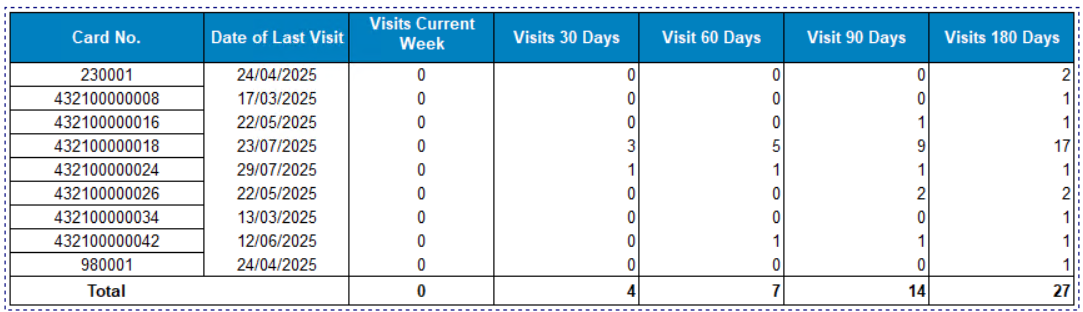
Customer Visit Report
Total visits for last x days includes last visit date for each Loyalty Card as of the Day selected
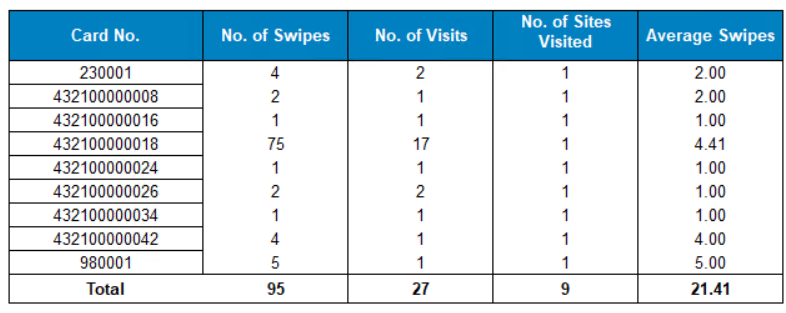
Average Swipes
Total swipes, visits, no. site visited and average swipes for each Loyalty Card as of the Day selected
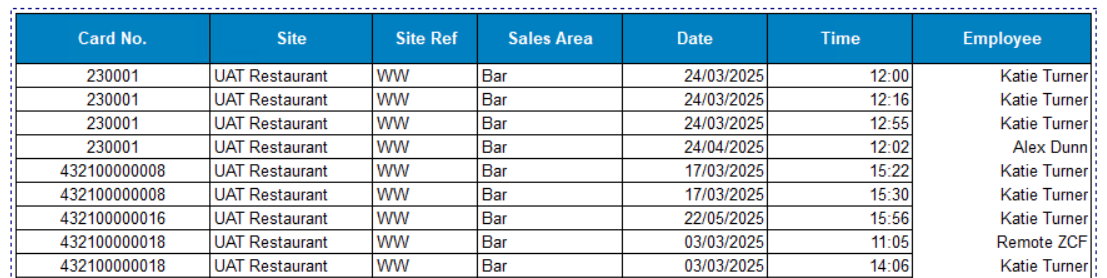
Detailed Customer Visit Report
Display record for each swipe on POS includes site information, date / time and employee
Uses
-
Measure loyalty programme engagement
-
Quick view of last visit date
-
Ability to drill down by card number
Summary Fields
| Field | Description |
|---|---|
| Swipes | When a loyalty card is assigned at the POS account (swiped, scanned, or manually keyed) |
| Visits | Counted as one per day per customer, regardless of how many times the card is used in that day |
| Average Swipes | Average number of swipes per visit |
| Date | Date of transaction |
| Time | Time the Loyalty Card was added to the POS account |
| Employee | Staff member who completed the transaction on POS |
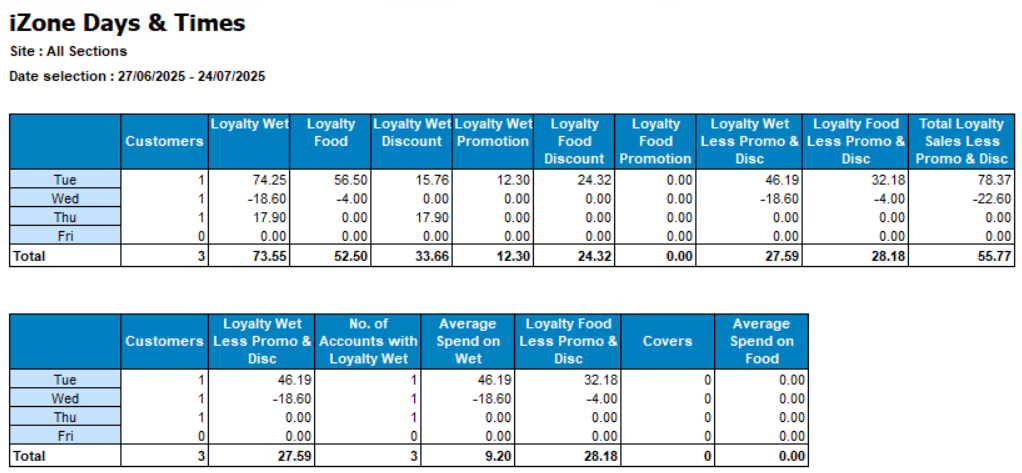
Displays total loyalty sales, discounts and promotions by day of the week for the selected period
Parameters
The following parameters can be selected for report generation:
-
Section - All Sites or Single Site
-
Date Selection - Date Range, Day, Weeks
The following layouts are available within this report:
Gross and Net
Uses
- Provides analysis by day of the week
- Assists with sales predictions
- Identify success of day specific Loyalty campaigns
Fields Summary
| Field | Description |
|---|---|
| Customers | Number of unique Loyalty Cards scanned |
| Loyalty Wet / Food | Total sales of Wet & Food where a Loyalty Card was assigned to an account |
| Loyalty Discount / Promotion | Total value of Loyalty discounts & promotions given, displayed as Wet / Food split |
| Loyalty Less Promo & Disc | Totals sales minus the discounts and promotions, displayed as Total and Wet / Food split |
| No. Accounts with Loyalty Wet | Number of accounts containing a Loyalty Card and where a product was purchased in the Wet division |
| Average Spend on Wet | Calculated by Total Wet Spend divided by the No. Accounts with Loyalty Wet |
| Covers | Total Aztec covers (if captured) for accounts where a Loyalty Card is present |
| Average Spend on Food | Uses covers count to calculate the average spend per head on food purchases |
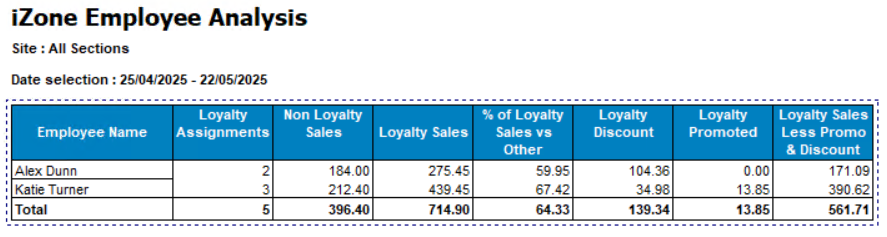
Tracks employee POS usage for Loyalty accounts
Parameters
The following parameters can be selected for report generation:
-
Section - All sites or single site
-
Date Selection - Day, Weeks, Period
The following layouts are available within this report:
Gross and Net
Uses
-
Identify misuse
-
Employee performance review
Fields Summary
| Field | Description |
|---|---|
| Loyalty Assignments | Total number of assigned loyalty cards |
| Non Loyalty Sales | Total sales without a Loyalty card assigned |
| Loyalty Sales | Total sales where a Loyalty card was assigned |
| % of Loyalty Sales vs Other | Loyalty Sales v non Loyalty Sales expressed as a percentage |
| Loyalty Discount | Total value of Loyalty discounts given |
| Loyalty Promoted | Total value of Loyalty promotions given |
| Loyalty Less Promo & Discount | Totals sales minus the discounts and promotions |
Displays total loyalty sales compared to non-loyalty sales, by individual site or across all sites. Includes a breakdown of the value and quantity of discounts and promotions applied, with the option to view results by Wet and Food categories
Parameters
The following parameters can be selected for report generation:
-
Section - All sites or single site
-
Date Selection - Date Range, Day, Weeks, Period
The following layouts are available within this report:
Loyalty Sales

Loyalty Sales by Division

Uses
-
Quick loyalty vs. non-loyalty sales comparisons
-
Site-by-site performance review
-
Instant visibility into loyalty sales
Fields Summary
All the below fields are presented in two sections: Loyalty and Non Loyalty
| Field | Description |
|---|---|
| Total Sales* | Value of total sales |
| % Loyalty/ Non Loyalty | Loyalty Sales v non Loyalty Sales (and vice versa) expressed as a percentage |
| Discount / Promotions* | Total value of promotions / discounts given and quantity |
| *Food / Wet | The Food and Wet Sales split for each field |
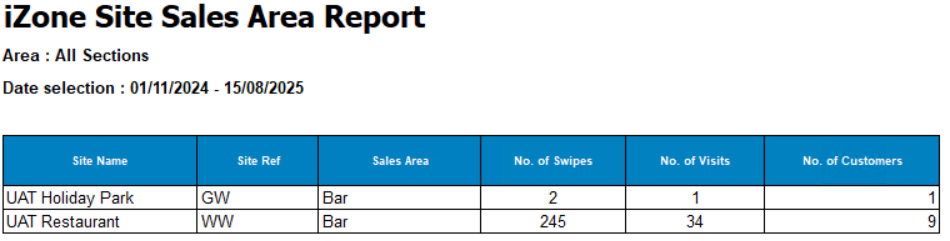
Displays total swipes, visits, and customer counts, grouped by Site and Sales Area
Parameters
The following parameters can be selected for report generation:
-
Section - All sites or single site
-
Date Selection - Date Range, Day, Weeks, Period
Uses
-
Identify location-specific trends
-
Target offers to promote underused areas
-
Compare swipe counts vs. customer counts
Summary Fields
| Field | Description |
|---|---|
| No. of Swipes | When a loyalty card is assigned at the POS account (swiped, scanned, or manually keyed) |
| No. of Visits | Number of Loyalty customers visits per site within the defined period. Counted as one per day per customer. |
| No. of Customers | Number of unique Loyalty Cards added to POS account within the defined period. |
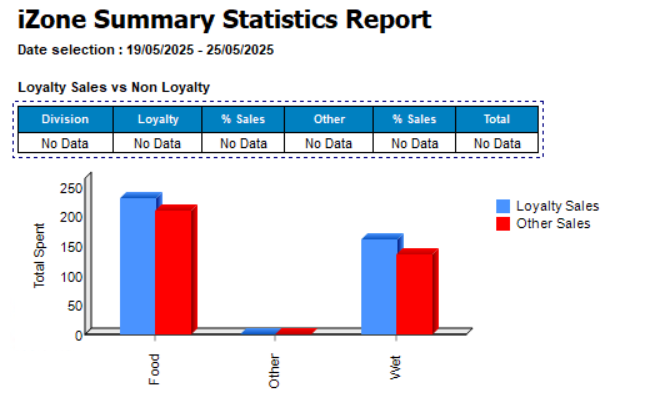
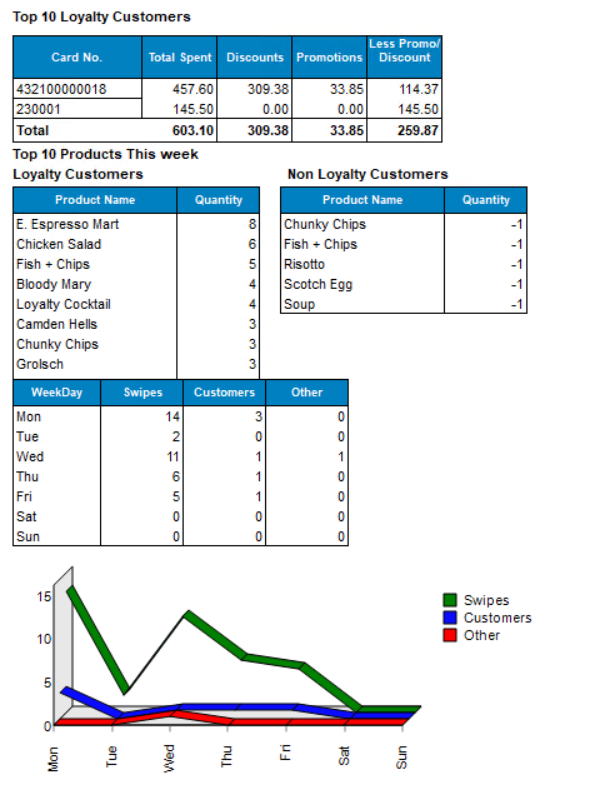
View of multiple graphs and tables to summarise Loyalty performance on the selected week
Parameters
The following parameters can be selected for report generation:
-
Section - All sites or single site
-
Date Selection - Date Range, Day, Weeks, Period
The following layouts are available within this report:
Gross and Net
Uses
-
Summary of Loyalty performance
-
Day breakdown
-
View top 10 products for Loyalty v Non Loyalty
-
Top 10 customers
Displays the Top 10 used cards within the defined period as well as the bottom 10 including details for Spend, Discount, Promotion, Visits. Only show cards that have a transaction on POS
Parameters
The following parameters can be selected for report generation:
-
Section - All sites or single site
-
Date Selection - Weeks
Uses:
-
Identify misuse
- View of top and bottom customers
Summary Fields:
Two views, one for Top 10 and one for Bottom 10
| Field | Description |
|---|---|
| Total Spend | Value of total sales |
| Discounts / Promotions | Total sale value of promotions / discounts |
| Less Promo/ Discount | Totals sales minus the discounts and promotions |
| No. of Visits | Visits (counted as one per day) within the defined week |
| Last Visit | Date of last visit |
| Avg Spend Per Visit | Total Spend divided by the No. of Visits |
Reporting Terms
-
Swipes: When a loyalty card is assigned at the POS (swiped, scanned, or manually keyed)
-
Visits: Counted as one per day per customer, regardless of how many times the card is used in that day
-
Card No.: Loyalty Card Number
-
Gross: Report values include tax
-
Loyalty Sales: Sales where a loyalty card is assigned
-
Non-Loyalty Sales: Sales with no loyalty card assigned
-
Site Name: Site name defined in Aztec Base Data
-
Site Ref: Site reference define in Aztec Base Data
-
Sales Area: POS terminal location within a site
-
Discount: Any percentage, fixed, or open value discount applied through the POS
-
Promotion: An offer or price adjustment that changes the purchase price, e.g. timed price changes, multi-buy offers, or buy-one-get-one-free
-
Sessions: Time slots in the trading day (e.g. breakfast, lunch, dinner)