Dashboard
The Estate Dashboard provides access to programs, customers, and companies within Loyalty, along with key metrics and data. The Company Dashboard shows the same information for a specific company.
Using the Dashboard
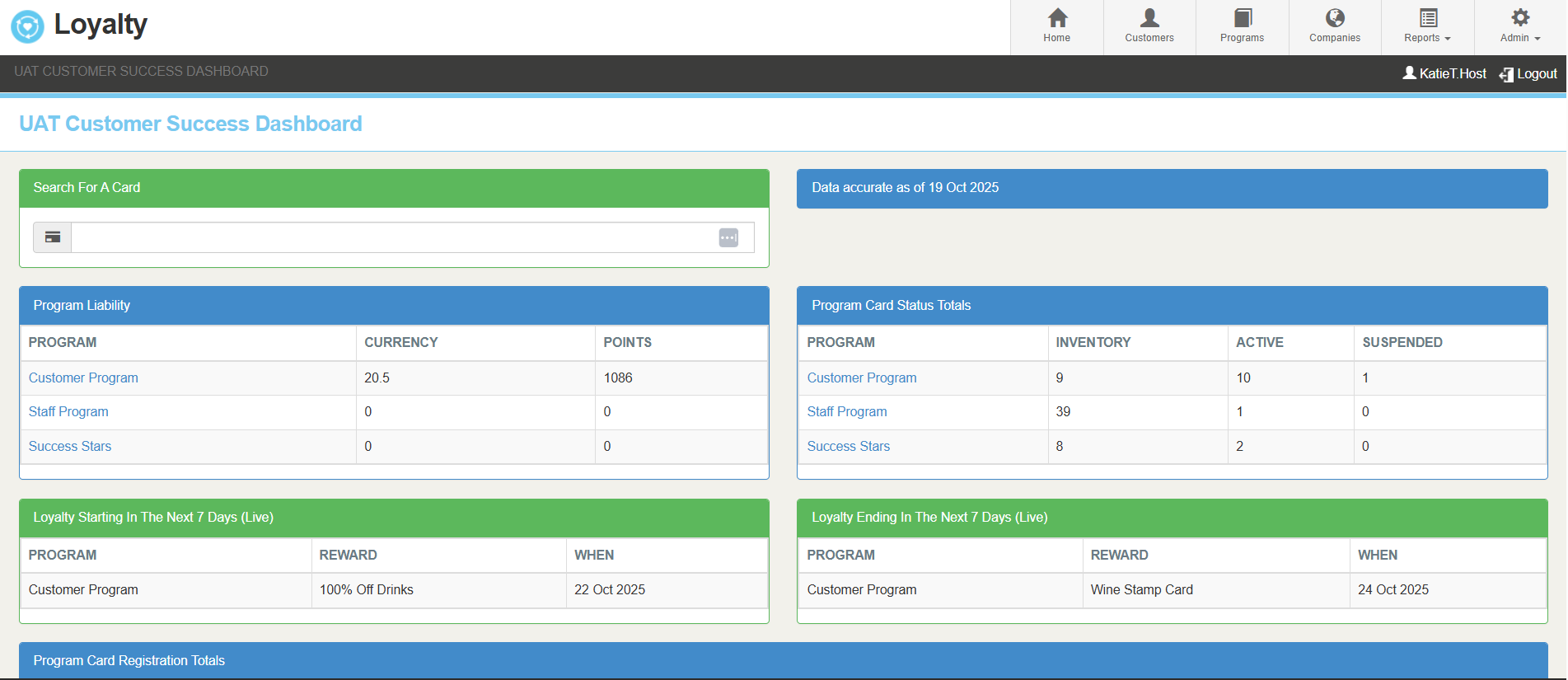
Data Type Indicators
Live Data Green: Live data (updated in real time)
Nightly Blue: Data calculated nightly. "Date accurate of" display the date this data was captured
| Feature | Description | Data Type |
|---|---|---|
| Search for a Card |
Enter a card number to quickly open the card details view |
Live Data |
| Program Liability |
Shows balances (currency and/or points) for all accounts under each program, regardless of card status |
Nightly |
| Program Card Status Totals |
Lists card status totals (Inventory, Active and Suspended) for each program |
Nightly |
| Loyalty Starting in the Next 7 Days |
Shows a list of rewards for each program that will become available for redemption within the next 7 days Includes the start date |
Live Data |
| Loyalty Ending in the Next 7 Days |
Shows a list of rewards for each program that end within the next 7 days. Includes the end date |
Live Data |
| Program Card Registration Totals |
Displays totals of sign ups for each program for: yesterday; last 7 days; last 31 days; previous 31 days; last 365 days; total |
Nightly |
| Loyalty Transactions Received From Point of Sale |
Tracks transaction volume and site visits (per PoS ticket) for: last & previous 7 days; last & previous 31 days; last 365 days |
Nightly |
Tips for Using the Dashboards
-
Identify Live vs Nightly Data – Look for the Live Data and Nightly indicators to quickly understand whether the data updates in real time or nightly
-
Check Your Access Level – Your view may differ depending on whether you are using the Estate or Company Dashboard. Some features may be restricted
-
Use Search Efficiently – Enter a full card number to quickly access a specific card’s details
-
Track Trends Over Time – Program liability or card registration totals can help you monitor performance trends across days, weeks, or months
-
Plan Campaigns – Use “Loyalty Starting” and “Loyalty Ending” lists to anticipate upcoming reward availability or expirations