Accessing the Guest Portal
The guest portal is a location whereby booking contact can manage their booking. Once a guests booking is made, the booker will receive email notification with a link to access their guest portal. They can use this portal to make changes to the date or time of booking, the number of people in attendance as well as their pre-order should they be assigned to one.
Guest Portal Topics
Accessing the Guest Portal
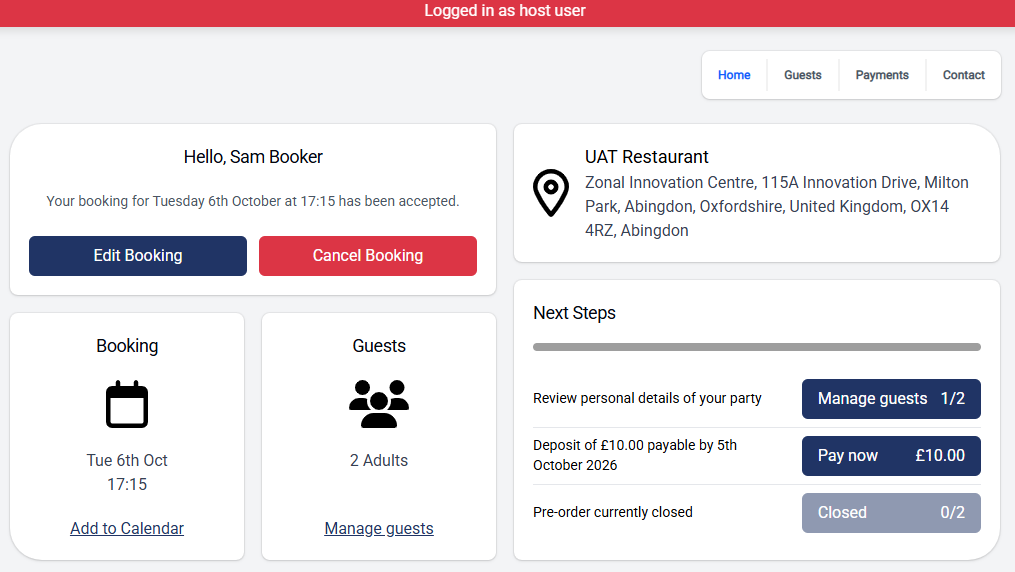
As a host you can access the Guest Portal and make changes on behalf of the guest.
Follow these steps to access the portal:
-
Open the Booking Overview
-
Click Go to Guest Portal
When the new window opens, the guest portal will display showing at the top of the screen "Logged in as host user". Any changes made within this screen will reflect on the booking, resulting in an email being triggered to the bookings email address. Any changes will also be logged in the View History tab