Host Reporting
Within the Events Host app, you have the ability to report on your bookings using the Bookings List, or using the Reports tab. The Report tab can be used for reporting on both Pre-Order and Extras.
Host Reporting Topics
Generating a Report
Follow these steps to generate reports:
-
Select the report type from the Report Categories
-
Pre-Orders
-
Extras
-
-
Select the required Date Range
-
Click Get Report
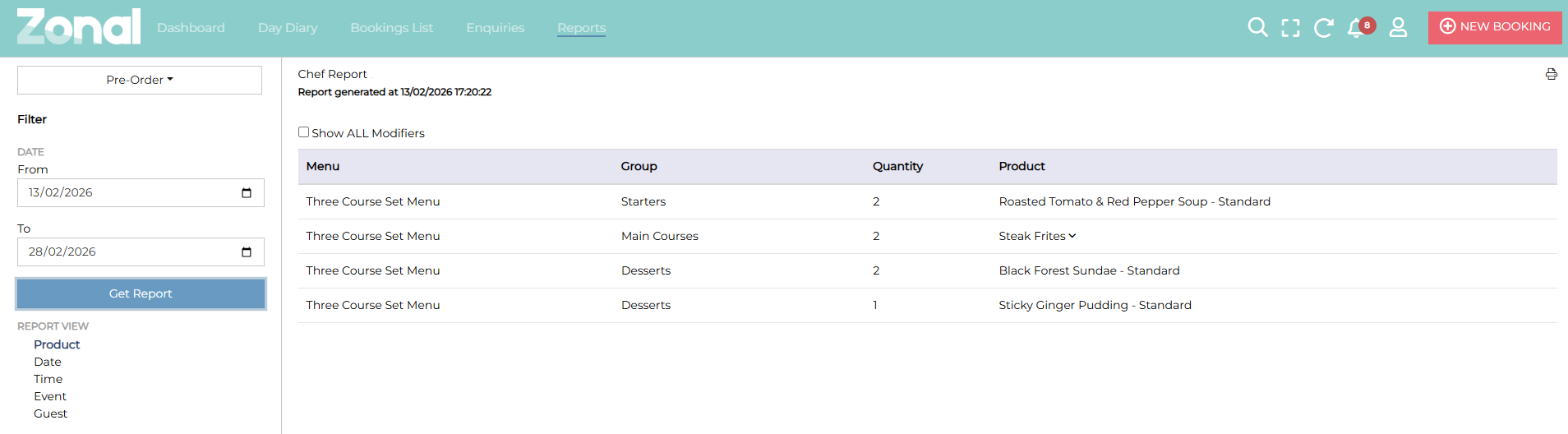
Once the report has loaded, you can view the outcome on the screen, or use the print screen option to print in a PDF format.
If you are reporting on Extras, these appear on a booking by booking basis. They will show the Extras by booking in date and time order. It will show the quantity of extras on each booking, the price total for each booking and also if they have been paid for.
When reporting on Pre-Orders, you have the ability to edit your view. You can define by either:
-
Product
-
Date
-
Time
-
Event
-
Guest
An example of a Pre-Order report is below:
-