Guest Ordering → Viewing Balances & Rewards
Viewing Balances & Rewards
Once a Loyalty card is linked to Guest Ordering, the card's balance and availability rewards can be consulted.
Viewing Balances & Rewards
View Balance screen in White Label App
To reach the “View balance screen”, the guest must be in the “My Loyalty Card screen” and from there the “View balance button” will be available.
The screen title will be the same as the button title, that can be changed in iOrder: (see: section iOrder elements overview: number 7)
Once in the “View balance screen”, the guest can see their balance and available rewards:
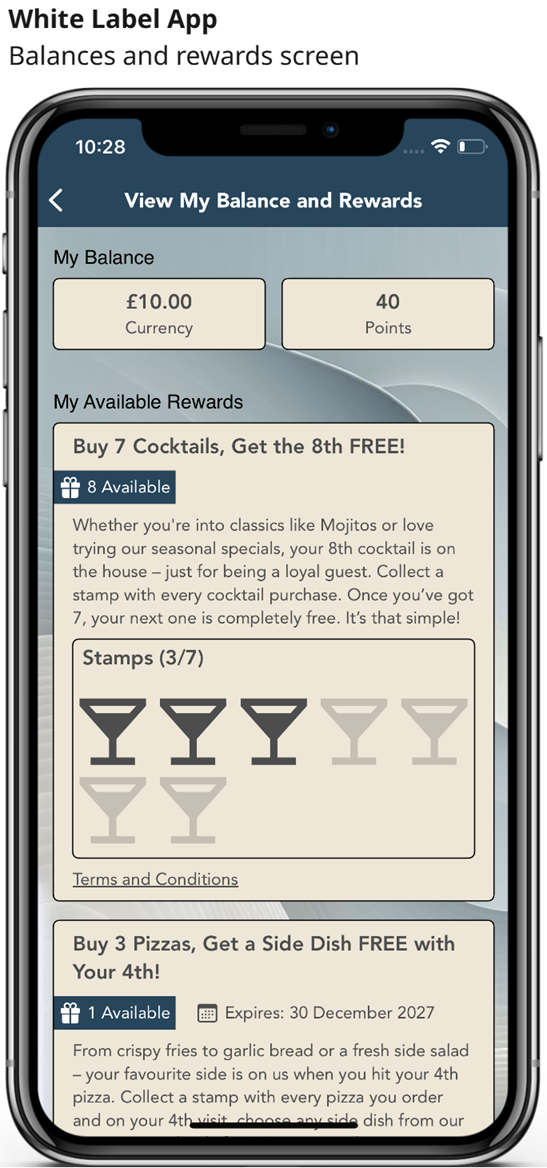
My Balance:
The following balances will display:
-
Balances Value types configured in Loyalty for that specific program. Loyalty | Programs | Program name | Value Types
-
The value types that will display are: Currency, Points and Items (custom)
-
The check box “Display on Widget” must be selected for that “value type” in Loyalty
-
Any other value types will not be displayed. E.g. “Total spend” and “Visits” will NOT display
-
My Available Rewards:
For a reward to display in this area, the reward must be configured in Loyalty as follows:
-
Aztec ID (i.e. promotion, discount or product) of the reward MUST BE unique in loyalty (same id cannot be used in more than one reward)
-
The rewards must be within the valid period
-
The rewards must be configured with a cost value type of Points or Items (custom), or must be a Buy x Get Y type of reward. (Any other cost types will not be displayed. E.g. "Currency", “Total spend” and “Visits” will NOT display)
-
If linked to an event (Registration, birthday, etc…) must be within the configured interval
-
Must be valid for the card
-
Must be valid for the tier
-
If the reward is limited to a period, must be within the valid period. (It will not display outside that period)
-
The reward must be configured to display in the widget. Balance widget display | Show reward | Must be selected (true) - Some reward types will need to be converted to "Advance reward" to allow this option to display in Loyalty.
-
Site is NOT considered, so if there is a site limitation, the reward will show even if the guest is in a different site in WLA.
-
The reward must have a positive balance, so the reward is redeemable (see exceptions below).