What's New in Kitchen iQ - 4.40
25 August 2026
click here for past feature updates
Screens
View Item Spec Images on Panel View Channels
Checking dish quality and plating accuracy is essential to meeting brand standards. The Spec Images feature supports this process by displaying product images alongside the channel view for a selected ticket. When there are more images than the panel can show at once, they cycle through in the order they appear on the ticket.
For more information on the setup click here or here for screen operations.

Screens
View Recipe Cards
Give your service teams instant access to the information they need, right when they need it. When an item is selected on an order, staff can view its Recipe Card in full screen, built from a PDF, PNG, or JPG, covering preparation instructions, ingredients, plating notes, or allergen information.
For more information on the setup click here or here for screen operations.
Past Feature Updates
Platform Maintenance
System & Database Upgrades
This release includes a number of behind-the-scenes upgrades to keep Kitchen iQ running at its best, including a Mongo Database upgrade and a move to .NET 8, improving performance, security, and long-term stability.

Important Release Information
This release will be the final version of Kitchen iQ to support the ZA55 screen controller. Customers looking to upgrade in the future should plan to move to Zonal's new Windows IoT screen controller devices instead.
Customers who have iServe Config Site Server installed can upgrade to Kitchen iQ 4.39, but will need to run the Kitchen iQ installer first.
Instances where Message Hub is installed on the same PC as Kitchen iQ will not be able to upgrade to Kitchen iQ 4.39 yet. This will only become possible once further work is completed to upgrade the .NET framework and MongoDB versions used by Message Hub.
Security
Security improvements to Kitchen iQ configuration endpoints
Improvements to the security of the API endpoints used to retrieve and display Kitchen iQ Config information within Aztec, ensuring that customer data remains protected and private at all times.
Timers
Timer Updates
In panel view, timer configuration has been enhanced with the addition of two distinct settings: Primary Timer and Secondary Timer. A new option, the Total Kitchen Timer, has also been introduced for Panel view. This timer starts when an order enters the kitchen and stops once the last item is delivered, giving sites better visibility of how long guests have been waiting since placing their order. (These new timer options replace the previous option of Order Station Timer drop down).
Previously, when Waiting to Start was enabled in Order Stages and Show WTS in Secondary Timer was active, the timer displayed the time an order spent in the waiting to start stage across all channels. This setting has now been removed and replaced by the new Primary and Secondary Timer options. After upgrading, any previously configured setting will automatically be applied to the Secondary Timer in all channels. This also allows customisation on a per-channel basis, enabling configurations to define whether this timer should be shown.
When multiple panel views were configured for a single channel, they all inherited the same timer settings. With this update, timer settings can now be configured independently for each panel view on the same channel.
The new settings introduced in version 4.38 will be visible in the configuration but will not take effect until the site is upgraded. Existing timer settings will be retained, ensuring no impact on sites prior to upgrade. However, any changes affecting these timers cannot be made until the upgrade is completed, at which point the new timer options will become available
Configuration & Onsite Operations
Delayed Orders displayed in Channels Count View
To support sites with advance bookings, an enhancement to the Channel Count View with the option to display same day Delayed Order count sent from the POS, highlighting the number of items that need to be prepared. A Total Count column will now be displayed with combined count of all other columns displayed. In the Configuration settings, Sites can now also modify this view to sort orders Alphanumerically, by Course Order or by Total Order count.


Technical
Dragontail integration: remove delayed field on tickets
When an order is placed through iOrder, it enters Kitchen iQ and a ticket is printed with 'Delayed' field. This leads to confusion as its not necessarily delayed and indicates late arrival. This field will be removed from the printed Dragontail ticket.
Technical
Kitchen iQ Routing after POS account saved
Routing Rules in Kitchen iQ are now re-calculated after an account is saved on the Aztec POS, ensuring that any late changes to an order are routed correctly. This calculation occurs automatically in the background after selecting Save on the till and no configuration is required. The changes support sites that make adjustments to an order after items are already added, such as changing the table number. Kitchen iQ will then route orders based on the orders conditions set prior to selecting save on the Aztec POS.
Improvements have been made to the Channels Customer View Split Screen, released in Kitchen iQ 4.35. Front end changes were implemented to prevent orders overlapping on certain screens and to ensure text appears centred in each section. Sites that want to use this Customer View should take this 4.36 release.
Configuration & Onsite Operations
Channels Customer View enhancements
Additional Configuration settings for Channels Customer View have been introduced. This includes an option to split screen for ready and preparing orders, option to increase order cell size and option to change order cell colour displayed on site screens. These changes will improve accessibility and customers can easily to identify orders at collection areas. For more information click here.
Improvements have been made to this feature in Kitchen iQ 4.36 and sites that want to use Split Screen capabilities should take this release.
Configuration & Onsite Operations
Channel limit increase
The Site's Configuration Channel limit has been increased from 25 to 50, allowing large and growing sites to setup specific Channels to display on each screen and improve the visibility of orders in each area.
Configuration & Onsite Operations
Station Dish Allocation with Routing Rule filters
Routing Rules can now be configured to allow Station Dish Allocation be applied with any additional filters. This was previously restricted and now allows sites to configure more specific Routing for each order.
Technical
Dragontail integration - promise times
Promise Times fields and other unused fields that the Dragontail Integration do not utilise will be ignored and not passed in the call made from Kitchen iQ.
Technical
Dragontail integration - external order ID
The external order ID will be mapped from Kitchen iQ to Dragontail, supporting order fulfilment and delivery through external providers including Uber Marketplace.
Technical
Optimisation for Site Server
Technical changes to the Kitchen iQ Site Server code have been implemented to improve performance and stability of the application, while maintaining existing functionality. These changes are particularly important to support busy customer sites.
Technical
Optimisation for Site Server Database
Technical changes to the Kitchen iQ Site Server database have been implemented to improve performance. Note: database upgrade was not included in this release as previously outlined. Further updates to the progress of this upgrade will be available in the next release.
Configuration & Onsite Operations
Wait Times
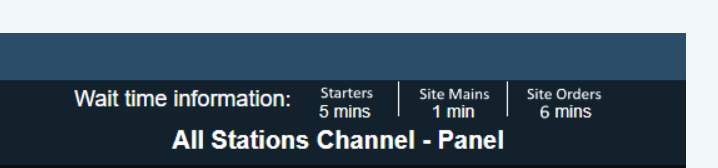
Automatically calculate an estimated wait time for an order to be ready.
Multiple calculations can be configured to determine Wait Times on specific courses and terminal group areas on a site.
Results can be displayed on site in the Channels screen, allowing front of house staff to understand and communicate how long the order should take to complete. This feature increases customer satisfaction, keeps them informed and reduces the uncertainty of Wait Times.
For more information click here
Onsite Operations - Average Times
Site Server - Average Times Export
When Average Times is configured in Channel settings, a JSON file will now be exported to the install path of the Kitchen iQ site server PC. This file will be overwritten each minute with all information on the Average Times configuration and the actual times calculated. Users will have the ability to access and use this data externally if needed.
-
Select Channels | Enable Average Times
-
Set either Prep or Delivery to be shown in the Average Time drop down
-
Ensure that the channel is configured for a screen in Site | Kitchen Screen | Allowable Channels
Onsite Operations
Tag Child Order Lines in Non Actionable Tickets
An enhancement to the 'Tag Child Order Lines' feature introduced in 4.31 now allows tags to be applied even to non-actionable items. For example, an order may still be in the preparation or assembly stage, but a serving channel operator can still tag items as needed.
Other Features & Information
| Feature | Description |
|---|---|
| Automate Install: Audit Extractor |
During the install for Audit Extractor, the IP Address will now be requested from the machine and auto-populated. The install process for sites out on the field can be a time consuming manual process. This enhancement will help automate part of the installation process for Audit Extractor, which will make the task more efficient and lower the risk of error. |
Configuration & Onsite Operations
Tag Child Order Lines
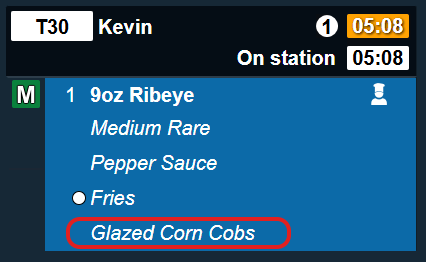
To improve operations it is now possible to "tag" child order line items.
When a channel is set to 'Panel View' with child lines configured as 'One Per Row,' an onsite operator can navigate between child lines using the bump bar's item up / down buttons. A red selection outline will highlight the chosen item. Pressing the 'Bump' button tags the item, displaying a white circle next to it. To untag an item, simply repeat the process. Tagged items are visible across all channels viewing the ticket.
Child items are those linked to a main (parent) item. For example, a steak is the parent item, while sauces, sides, and cooking temperature are its child items.
Visually identifying child items that have been prepared or served helps maintain awareness of order status.
Tagging items does not affect the normal process of bumping the main item.
Configuration & Onsite Operations
Print & Display Bumped Items Only
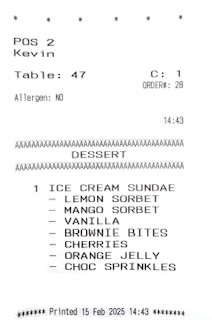
In service scenarios where items are served to guest as soon as they are ready, a new print rule ensures that active items are printed, with the option to print only the individual item when necessary.
-
Select Printing | add a new rule Any Item is Active
-
Select the check box Print Item Only, this will print each individual item as it becomes in the active, for example at the ready order stage
Onsite Operations - Action History
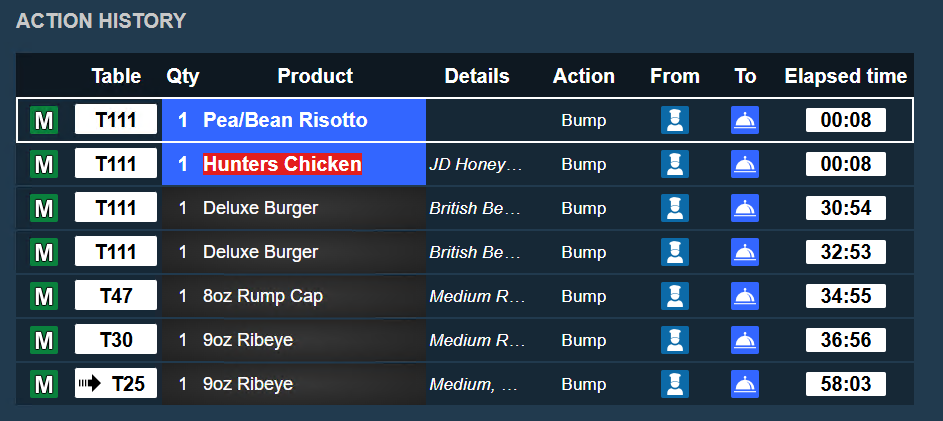
Screen Enhancements to Action History
The Action History screen has been enhanced to provide a clearer view of all actions performed on a channel.
Pressing and holding the Undo button will open the action history, displaying the most recent actions at the top.
When selecting an item, you can choose to 'Bump To' another station or 'Undo' to return it to the current station.
Configuration & Onsite Operations
Order Load Balancing
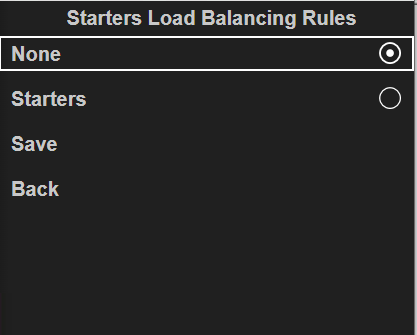
To enhance onsite operations, a new configuration allows orders to be distributed across multiple stations. Customisable rules enable a primary station to assign orders to one or more secondary stations, ensuring a balanced workload, orders are distributed in a 'round robin' style.
When additional workload balancing is needed, onsite operators can enable this feature and disable it once normal operational capacity is restored.