Reduced Rate VAT Changes for Children's Meals - Summer 2026
In a Ministerial Statement made by the Chancellor on 21 May 2026, the government announced the introduction of a temporary reduced rate of VAT (5%) for supplies of children’s meals and tickets to certain attractions, intended to reduce the cost of selected activities and services for families with children during the summer holiday period. The reduced rate will apply from 25 June 2026 to 1 September 2026 (inclusive).
The reduced rate for children’s meals and children’s tickets for cinemas, theatres, exhibitions and shows covers those supplies that are marketed, priced and presented as intended for children. These do not generally apply to supplies aimed at adult customers, except where those supplies form part of a qualifying family package as described in this brief. The reduced rate will apply to tickets for all customers for attractions set out within this brief.
This cut in VAT rate from the standard rate of 20% will be introduced by statutory instrument and have effect on admissions from 25 June 2026 to 1 September 2026.
What changes are needed to support this government change?
-
Updated Tax Rates for products relating to Children's Meals and Drinks
-
Create new soft drink products (where they can be sold to both adults and children)
-
Update any promotions related to children's meals and swap any drink related products
Creating New Tax Rules & Apply to Products
Follow these steps to add an inclusive tax rule:
-
Click Add
-
Enter the Inclusive Tax Rule Name and Description (optional)
-
Select Applies To
-
Sold Goods Only
-
Purchased & Sold Goods
-
-
Click Next
-
Enter the 5% Rate percentage and set if the rate should Apply by Default
-
Click Finish
-
Apply the required filters to located children's products
-
Change the current 20% tax rate to be the new 5% rate
Remember to complete this change before any sales of products on the 25 June 2026
-
Perform a Send Communications & Send to POS
-
Perform a Send to POS
Soft Drinks
Where soft drinks that are displayed on children's menus and are setup as one product which could be consumed by an adult or child our recommendation is for those products to be created as a separated dedicated product, set with the lower 5% rate for the duration of this change.
Changes for within iOrder Platform
For customers using iOrder Platform to manage guest facing menus the following changes should be completed after a successful product sync from Aztec:
-
Update the Tax Rule friendly name
-
Make any menu changes for new soft drinks
Bookings Invoices
If you are creating invoices for bookings within the period of this initiative ensure the correct VAT rates are being entered when creating the invoice.
For more information visit the Bookings Knowledge Base here.
Finance Exports
The Aztec Finance Export reads VAT codes from your Aztec POS system and uses them to determine how transactions are posted to your accounting / ERP system.
For any customers running our standard finance exports the introduction of a new 5% rate means that:
-
Some products will now carry a different VAT code to the rest of your menu during the qualifying period
-
Your Finance Export must be correctly configured to handle multiple VAT rates simultaneously
-
The export will need to correctly distinguish between 0%, 5%, and 20% rated items
-
After 1 September 2026, VAT codes must revert - if they are not changed back, your export will continue posting at the wrong rate
Customers with existing 5% VAT codes
For customers who retained a 5% VAT code from the COVID hospitality relief (July 2020–March 2021): You may already have a 5% VAT code configured in your system. You should verify that this code is correctly mapped in your Finance Export configuration before the new period begins, as the qualifying products and rules differ from the COVID relief period
Actions Required Before 25 June 2026
Check your Finance Export VAT code mapping — In the Finance Export, navigate to the Tax / VAT configuration and confirm that the 5% VAT code is mapped to the correct nominal account in your accounting system. If the 5% code does not appear, it will need to be added.
-
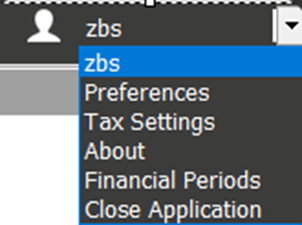
To access Tax Settings, click your username in the top-right corner of the Finance Export application and select Tax Settings from the drop down menu
 This will open the Tax Details screen where all VAT rates and their associated date ranges are configured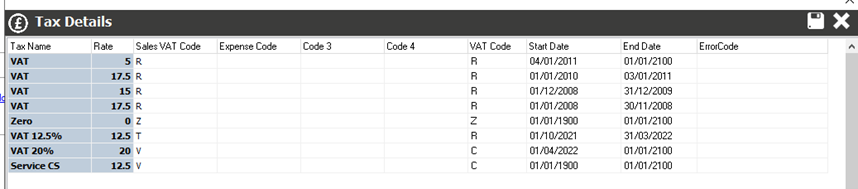
-
For the temporary 5% VAT rate, you will need to ensure a VAT entry exists with:
-
Rate: 5
-
Sales VAT Code: R (or as appropriate for your accounting system)
-
Start Date: 25/06/2026
-
End Date: 01/09/2026
If a 5% entry already exists (for example, from the COVID relief period), update its Start Date to 25/06/2026 and End Date to 01/09/2026. Do not leave an old end date in place or the rate will not apply correctly during the qualifying period -
-
Check your allocation settings
Ensure that your transaction type allocations correctly handle the 5% rated transactions. If you are using consolidated allocations, verify that the VAT code on the consolidated entry is correct and will not mispost the reduced-rate transactions
-
Test before go-live
Where possible, run a test export for a date in the qualifying period to confirm that 5% rated items are appearing correctly and are posting to the expected nominal accounts
Actions Required After 1 September 2026
-
Revert VAT codes in Aztec POS - on or after 1 September 2026, all products that were temporarily set to 5% must be reverted to their standard VAT rate (typically 20% for hot / restaurant food). Failure to do this will result in underreported VAT on your export
-
Confirm export is posting correctly - run your first post-period export and check that no 5% coded transactions are appearing for dates after 1 September
Potential Issues to Watch Out For
| Issue | What to Check |
|---|---|
| Missing 5% VAT code mapping in Finance Export |
If the 5% VAT code exists in Aztec POS but is not mapped in the Finance Export, those transactions may export without a VAT code or post to an incorrect nominal account. Check your Tax configuration in the Finance Export before go-live |
| Consolidated VAT posting |
If your Finance Export is configured to consolidate VAT into a single line, mixed-rate transactions (0%, 5%, 20%) on the same export run may not split correctly. Review your VAT allocation to ensure each rate is handled separately |
| Excel template customers |
If you are using an Excel template-based export, verify that your template has a row/mapping for 5% rated transactions. Templates designed only for 0% and 20% will not automatically accommodate the new rate |
| Forgetting to revert after 1 September |
This is a temporary measure. If VAT codes are not reverted in Aztec POS after 1 September 2026, the Finance Export will continue to post at 5% resulting in underpayment of VAT. We strongly recommend setting a calendar reminder |
| COVID 5% legacy codes |
Customers who have a 5% code remaining from the COVID period should audit which products it is currently applied to. It is possible the code has drifted and is applied to products that do not qualify under the new rules |