Redemptions
Corby+Fellas gift cards can be redeemed at the point of sale to pay for a transaction. To enable the Corby+Fellas feature, complete the setup on the following page.
Redemptions Topics
Requirements
Credentials & Settings
The following credentials and settings should be provided by Corby+Fellas:
-
Username
-
Password
-
URL
Setup
Head Office Site Master
Payment Method
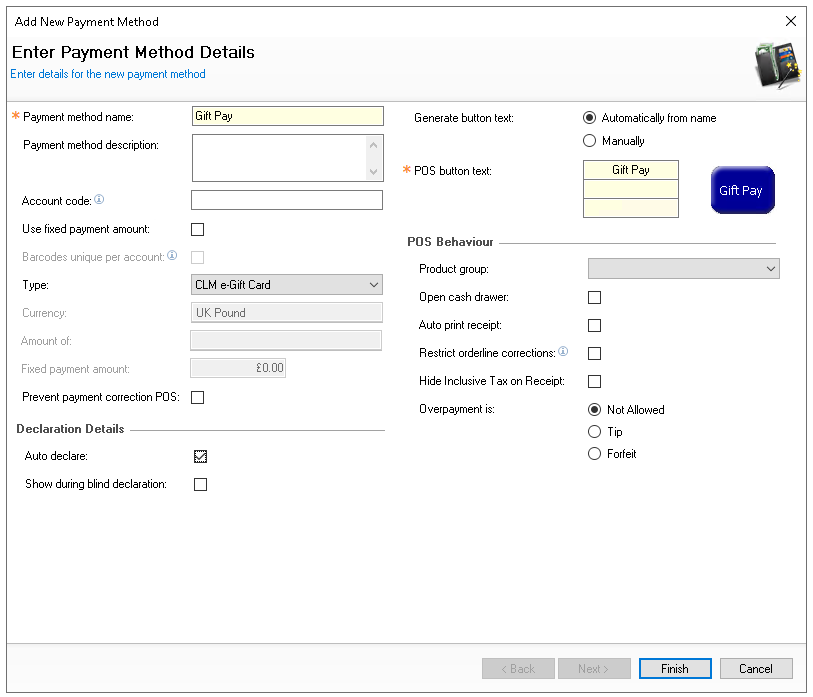
Follow these steps to add room payment method:
-
Click Enter the following information
-
Enter the name 'Gift Pay'
-
Set the following options
-
Auto Declare - Enabled
-
Type - CLM e-Gift Card
-
-
Set other fields and settings as required
-
Click Finish
-
Select the required Theme Panel Design or Shared Panel where the buttons should be added
-
From the Button Picker | Other Lists | Payment add the Gift Pay payment method
For more information on adding buttons to shared panels click here -
Click Save
Balance Check
If required, a balance check button can also be added, which enables POS operators to check the balance of a gift card without needing to perform any sale or redemption activity.
Follow these steps to add the balance check function:
-
Select the required Theme Panel Design or Shared Panel where the buttons should be added
-
From the Button Picker | Other Lists | iZone add the e-Gift Balance Check button
-
Click Save
POS Integration Configuration
Follow these steps to configure the plugin information:
-
From the Plugin drop down select Corby+Fellas
-
Enter the following required information
-
Username - as provided by Corby+Fellas
-
Password - as provided by Corby+Fellas
-
URL - as provided by Corby+Fellas
-
-
Click Save
Prefixes
For the point of sale terminal to recognise gift cards and perform the appropriate actions when they are entered or scanned, the prefix groups must be updated to match the specified number of digits that make up the gift card prefix.
For more information on managing prefixes click here to view the prefix setup help guide.
Other Setup
Site Master Site
-
POS Integration - 1.52.0 or above installed with Corby+Fellas
Requests for POS Integration installation should be made to your Zonal Account Representative