
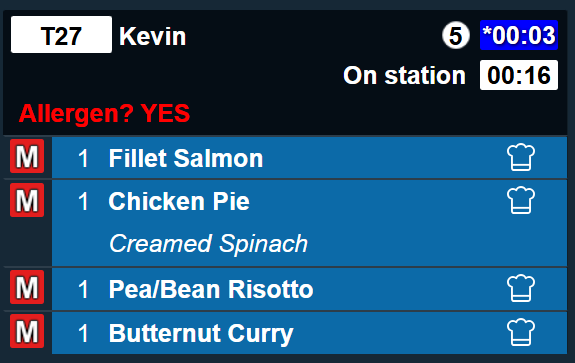
Display allergen information for important visibility on order tickets
Managing the preparation of food for guests with allergens is crucial and undoubtedly follows strict guidelines within every organisation. For sites using Kitchen iQ, the customer information prompt configured in Aztec for allergen checks can be setup on panel views (ticket style) to display the captured information. This ensures allergen details are consistently displayed on every order, providing alignment across both point of sale and kitchen preparation screens.
Channel Configuration
The channel configuration determines the layout and settings of what the screen user will be shown, one of the setting that can be enabled is to display an additional line with the customer information prompt text and answer to support the full order life cycle.
-
In the Views | Settings section select the required option from the Show Customer Info Prompt drop down
-
Not Shown - this option will not be used and nothing will be displayed
-
When 'Yes' Selected - this option will only display the prompt information when the answer was yes
-
When 'No' Selected - this option will only display the prompt information when the answer was no
-
When 'Yes or No' Selected - this option will show the prompt information for either yes or no answers
-
-
Click Save